Table of Contents >> Show >> Hide
- Quick Reality Check: Not Every PS3 Plays PS2 Discs
- Way #1: Play Original PS2 Discs on a Backward-Compatible PS3
- Way #2: Buy and Play “PS2 Classics” (Digital) on the PS3
- Way #3: Play PS2 Favorites via PS3 Remasters, HD Collections, and Ports
- Bonus Tips That Make Any Method Less Annoying
- Conclusion: Pick the Method That Matches Your PS3 (and Your Patience)
- Real-World Experiences: What It Feels Like to Play PS2 Games on a PS3 (Plus the Stuff People Don’t Tell You)
You’ve got a PlayStation 3, a stack of PlayStation 2 classics, and a dangerous idea:
“What if I only plug in one console?” That’s the dreamone sleek(ish) black box,
one controller, one HDMI cable, and your teenage self nodding in approval.
The reality is a little more “choose your own adventure.” Some PS3s can swallow PS2 discs like it’s 2006.
Some PS3s can only play specific PS2 titles as downloads. And some PS3s will look at your PS2 disc like,
“Aw, cute. No.” The good news: there are three legit ways to get PS2-era gameplay on a PS3,
and once you understand which lane you’re in, it’s pretty painless.
Quick Reality Check: Not Every PS3 Plays PS2 Discs
Before we jump into the three methods, let’s solve the biggest PS3/PS2 myth:
PS2 disc playback is model-dependent. Early “fat” PS3 models offered PS2 backward compatibility,
while later revisions (including Slim and Super Slim) generally do not.
How to tell (fast) if your PS3 might play PS2 discs
- Look at the front USB ports: Backward-compatible “fat” models are often associated with four front USB ports, while later models typically have two.
- Check for memory card slots: Early “fat” systems sometimes have built-in card readers. Newer ones usually don’t.
- Find the model number: On the back or bottom you’ll see a “CECH” model code. That code is the best way to confirm your exact revision.
Even on compatible hardware, PS2 games may run slightly differently than on an actual PS2, and some titles may have
quirks. So think of PS2-on-PS3 as “mostly magical,” not “perfectly identical.”
Way #1: Play Original PS2 Discs on a Backward-Compatible PS3
This is the holy grail: pop in a PS2 disc, press start, and let nostalgia do the rest.
If you own a backward-compatible PS3, this is usually the most satisfying option because it keeps your physical collection alive.
Step-by-step: PS2 disc playback
- Update your PS3 system software if it’s been a while. Updates can improve general stability and compatibility.
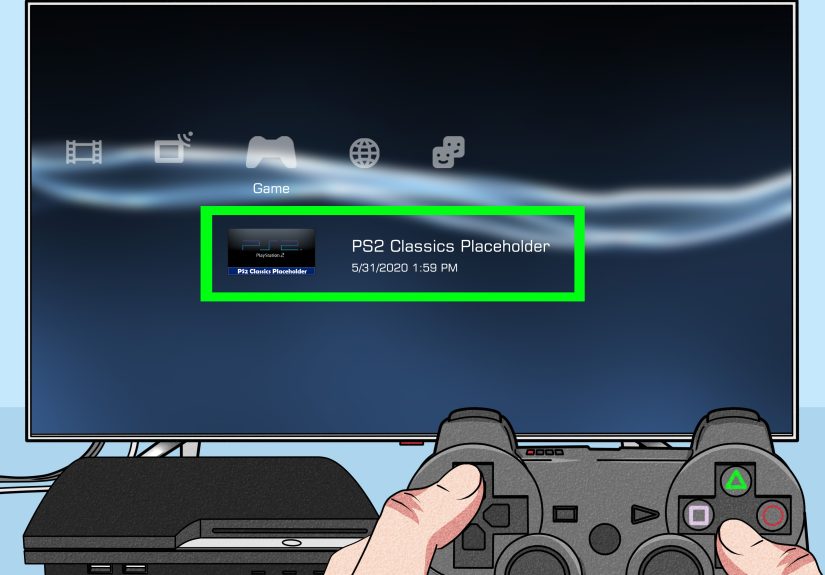
- Insert the PS2 disc and launch it from the PS3’s Game menu (XMB).
- Create a virtual PS2 memory card so you can save:
- Go to Game > Memory Card Utility (PS/PS2).
- Select Create New Internal Memory Card and follow prompts.
- Assign it to a slot if the game asks (Slot 1 is the usual default).
- Optional but recommended: tweak display settings (more on that below) for a cleaner look on HDTVs.
Make PS2 games look better on a modern TV
PS2 games were built for SD resolutions. The PS3 can help by upscaling and smoothing the image.
This is the difference between “my eyes are being sandblasted” and “okay, I can work with this.”
- PS/PS2 Upscaler: Boosts the output to HD-friendly resolutions (like 720p/1080i/1080p). Great for reducing the “tiny SD game in a sea of pixels” effect.
- PS/PS2 Smoothing: Softens jagged edges. Sometimes it’s a glow-up; sometimes it’s a slight blur. Try it both ways and pick your preference.
Move your PS2 saves over (if you still have them)
If you’ve got PS2 memory cards with treasured save files (hello, 80-hour RPG file you refuse to abandon),
you can transfer that saved data to the PS3 using a PS2 memory card adaptor (sold separately).
Then the PS3 can copy those saves into its Memory Card Utility.
Pros and cons of Way #1
- Pros: Uses your physical PS2 discs; feels authentic; often the cheapest long-term if you already own games.
- Cons: Requires a specific PS3 model; compatibility varies; older “fat” consoles can run hot and may need extra care (cleaning, airflow, and a good place to breathe).
Way #2: Buy and Play “PS2 Classics” (Digital) on the PS3
If your PS3 can’t play PS2 discs, don’t panicSony sold a selection of PS2 games digitally as
PS2 Classics. This route is especially good if you want convenience (no disc swapping),
or if you’re hunting for specific classics that got official digital releases.
What PS2 Classics are (and aren’t)
- They are PS2 games officially packaged to run on PS3 via emulation.
- They aren’t your entire PS2 library. Availability depends on region and licensing.
- They usually aren’t remastersexpect PS2-era visuals, sometimes with PS3 upscaling options.
How to purchase PS2 Classics in 2026 (the practical part)
Here’s the modern twist: you generally can’t shop for PS3-era content through the web/mobile PlayStation Store the way you do for PS4/PS5.
Purchases for PS3 content are typically made on the PS3 itself. Also, PS3-era store payments changed:
you usually need to add funds to your wallet first (for example, via gift card redemption or adding funds on a newer device/website),
then buy on the PS3 using that wallet balance.
Step-by-step: Playing PS2 Classics
- Sign in to your PlayStation Network account on the PS3.
- Add funds to your wallet using methods supported for your region (gift card is the most universal option).
- Open PlayStation Store on the PS3 and search for the title you want (try keywords like “PS2 Classics,” the game name, or the series).
- Purchase and download the game.
- Create an internal PS2 memory card (same idea as Way #1):
- Game > Memory Card Utility (PS/PS2) > Create New Internal Memory Card
- Launch the game and save normallyyour saves go to that virtual memory card.
Pros and cons of Way #2
- Pros: Works on most PS3 models; no discs; easy saves via virtual memory cards; often stable for supported titles.
- Cons: Limited catalog; availability varies by region; you’re buying digital licenses, not resurrecting every disc you own.
Way #3: Play PS2 Favorites via PS3 Remasters, HD Collections, and Ports
This one is sneaky, but extremely effective: many beloved PS2 games were re-released on PS3 as
HD collections, enhanced ports, or remasters.
It’s not the same as “playing a PS2 disc,” but you’re still playing the gameoften with better performance,
cleaner visuals, and quality-of-life improvements.
Why this method is underrated
- Better image quality: Many collections output in HD and handle widescreen more gracefully than raw PS2 output.
- Modern conveniences: Some releases add trophies, improved menus, and smoother performance.
- Availability: You might find these on disc, used game stores, or sometimes digitally (depending on region and current store access).
Examples of PS2-era games you can play “the PS3 way”
Not a complete list (that would be a small novel), but these illustrate the idea:
- God of War Collection (PS2 originals brought to PS3)
- Metal Gear Solid HD Collection
- Jak and Daxter Collection
- Sly Collection
- Ratchet & Clank Collection
- ICO & Shadow of the Colossus Collection
- Devil May Cry HD Collection
- Final Fantasy X/X-2 HD Remaster
Pros and cons of Way #3
- Pros: Often the best “looks and runs” option; easy HDMI life; great for popular franchises.
- Cons: Not every PS2 game got a remaster; sometimes the “definitive” version changes music, UI, or minor features; you may end up rebuying favorites.
Bonus Tips That Make Any Method Less Annoying
1) Don’t ignore PS/PS2 Upscaler and Smoothing
If your PS2 game looks weird on an HDTV, it’s usually not “broken,” it’s just being faithfully SD in a 4K world.
Try toggling Upscaler and Smoothing. If smoothing makes it too soft, turn it off and rely on upscaling only.
2) Region rules: PS2 discs don’t magically become region-free
PS3 games are famously flexible with region differences, but PS2 discs generally keep their region lock.
If you’re trying to play an imported PS2 disc, your PS3 may refusebackward compatibility doesn’t typically override that rule.
3) Saving is easier than it looks
Once you create a virtual PS2 memory card, saving is basically “normal PS2 behavior,” just stored on your PS3.
If you’re transferring old saves, the Memory Card Utility is your friendno sorcery required.
4) Controller expectations: it’s mostly fine, with a few “PS2-era quirks”
Most PS2 titles that run on PS3 play nicely with a DualShock 3. If a game uses a very specific accessory or niche feature,
your mileage may vary. Keep it simple: standard controller, standard gameplay, maximum happiness.
Conclusion: Pick the Method That Matches Your PS3 (and Your Patience)
If you own a backward-compatible PS3, playing PS2 discs is the closest thing to a time machine that doesn’t require a lab coat.
If you don’t, PS2 Classics and PS3 remasters still deliver a great PS2-era fixoften with fewer cables and fewer compromises.
The best choice comes down to one question: Are you trying to revive a physical disc collection, or just play the games?
Either way, your PS3 can absolutely be a retro hubas long as you let it be what it is:
a slightly dramatic, surprisingly capable console that still knows how to have fun.
Real-World Experiences: What It Feels Like to Play PS2 Games on a PS3 (Plus the Stuff People Don’t Tell You)
The first time someone boots a PS2 game on a PS3, there’s usually a tiny pause where the brain goes,
“Wait… this is allowed?” Because it feels like cheating time. You’re looking at a console built for Blu-ray movies,
fancy menus, and seventh-gen blockbustersyet it’s suddenly loading a PS2 title that originally lived in the era of baggy jeans,
CRT TVs, and memory cards you guarded like a dragon hoarding treasure.
If you’re using a backward-compatible PS3 with discs, the experience is delightfully physical. You grab the actual disc,
you hear that familiar spin-up, and you get that old-school “game is starting” vibeno download bars, no patch notes,
no “required storage space: your entire childhood.” It’s also when people notice how much the PS3 can improve the “living room look.”
With HDMI, your setup becomes cleaner instantly. And when you toggle the PS/PS2 upscaling and smoothing options,
it’s like adjusting the seasoning on a meal you’ve eaten for 20 years: you didn’t know you wanted it different, but now you’re curious.
Digital PS2 Classics have a different kind of magic: convenience magic. People love being able to scroll their PS3 game list
and see PS2 icons sitting there like they pay rent. The most common “aha!” moment is saving.
Once the internal memory card is created, saving feels normal againjust without the panic of “Where did I put that memory card?”
It’s especially satisfying for RPGs and long campaigns. There’s a sense of stability: your save data lives on the hard drive,
not on a tiny plastic rectangle that can disappear into a couch dimension.
Then there’s the “remaster route,” which often becomes the favorite of people who care about comfort.
A good HD collection on PS3 can feel like the game got a shower, a haircut, and a better attitude.
Widescreen support, clearer text, smoother visualsthese things add up, especially if you’re playing on a big modern display.
A lot of players describe this method as “the version I actually finish,” because it’s easier on the eyes and doesn’t require compatibility roulette.
Of course, real-world PS3 ownership also brings real-world PS3 personality. Older consoles can be louder than you remember,
like they’re trying to cool a small sun. People end up learning practical habits: give the console breathing room,
keep it dust-free, and don’t tuck it into a tight shelf like it’s being punished. And yes, you’ll probably have at least one moment
where you stare at a “this disc cannot be played” message and do the universal gamer ritual:
reinsert the disc, reinsert your confidence, and pretend you weren’t emotionally invested.
But when everything clicksyour model supports what you’re trying to do, your memory card is set up,
and the game launches cleanlyit’s genuinely special. It’s not just “retro gaming.”
It’s a reminder that great games age better than we do, and that sometimes the best tech upgrade is simply
finding a smarter way to replay what you already love.