
Table of Contents >> Show >> Hide
- Quick Snapshot: 2021’s Ergonomic Chair Hall of Fame
- How We Judged Ergonomics (So Your Back Doesn’t File a Complaint)
- 9 Best Ergonomic Office Chairs 2021
- #1 Steelcase Gesture Best Overall for Modern, Multi-Device Postures
- #2 Herman Miller Aeron Best Mesh Chair (Especially If You Run Hot)
- #3 Steelcase Leap Best for People Who Want a “Dialed-In” Fit
- #4 Herman Miller Embody Best for Long Sessions and Micro-Movement
- #5 Haworth Fern Best Flexible Back Support (Comfort That Moves With You)
- #6 Haworth Zody Best for Sit-Stand Desks, Forward Leaners, and “Perch” Postures
- #7 Humanscale Freedom Best “Minimal-Buttons” Ergonomic Chair
- #8 HON Ignition 2.0 Best Mid-Range Value (Real Ergonomics, More Reasonable Price)
- #9 Staples Hyken (Union & Scale FlexFit) Best Budget-Friendly Ergonomic Starter Chair
- How to Dial In Any Ergonomic Chair in 7 Minutes
- Common Mistakes That Make a Great Chair Feel Terrible
- New vs. Refurbished: The 2021 Money Move
- Real-World Experiences: From the Chair Trenches
- Conclusion: Pick the Chair That Fits You (Not the Hype)
In 2021, millions of people discovered a shocking truth: a “free” dining chair becomes extremely expensive the moment your lower back starts sending invoices.
The work-from-home boom didn’t just sell webcams and ring lightsit made ergonomic office chairs the new status symbol of adulthood.
This guide ranks nine standout ergonomic office chairs that were widely favored during the 2021 home-office eraranging from “heirloom-grade” premium thrones
to budget picks that still respect your spine. You’ll also get practical fit tips, real-world buying advice, and a long, honest section on what it’s like to live
with these chairs day after day (because a chair can look incredible online and still feel like a polite betrayal in real life).
Quick Snapshot: 2021’s Ergonomic Chair Hall of Fame
If you want the “skim first, deep-dive later” version, here’s a quick map. Prices vary wildly by options, upholstery, and sales,
so consider these tiersnot exact numbers.
| Rank | Chair | Best For | Signature Strength | Price Tier |
|---|---|---|---|---|
| #1 | Steelcase Gesture | All-day, multi-device work | “360” arm movement + deep adjustability | Premium |
| #2 | Herman Miller Aeron | Hot sleepers / warm offices | Breathable suspension + multiple sizes | Premium |
| #3 | Steelcase Leap | Dialing in a precise fit | Seat “glides” as you recline | Premium |
| #4 | Herman Miller Embody | Long sessions & micro-movement | Pixelated support + “spine” tuning | Premium |
| #5 | Haworth Fern | Flexible back support | Wave Suspension + edgeless back feel | Premium |
| #6 | Haworth Zody | Sit-stand desks & forward leaners | Forward tilt + asymmetrical lumbar option | Upper-mid |
| #7 | Humanscale Freedom | Minimal knobs, smart recline | “Set-and-forget” recline design | Premium |
| #8 | HON Ignition 2.0 | Value with real ergonomics | Synchro-tilt + seat slider + lumbar option | Mid-range |
| #9 | Staples Hyken (Union & Scale FlexFit) | Budget-friendly ergonomic basics | Mesh + headrest + lumbar on a budget | Budget |
How We Judged Ergonomics (So Your Back Doesn’t File a Complaint)
Ergonomics isn’t magicit’s alignment plus support plus adjustability. A good ergonomic office chair helps you sit in a neutral posture:
feet supported, hips and knees comfortable, lower back supported, shoulders relaxed, and elbows near your sides.
What “ergonomic” should actually mean
- Seat height range: You should be able to keep feet flat on the floor (or on a footrest), without perching on your toes.
- Seat depth: The seat pan should support your thighs without cutting into the back of your knees. A slider helps a lot.
- Lumbar support: Best case: adjustable height and depth. Next best: a dynamic back that supports your natural curve as you move.
- Backrest recline: Recline isn’t “being lazy.” It changes pressure and can reduce strainif the chair supports you while you lean back.
- Armrests that don’t sabotage you: Arms should help your shoulders relax, not push them up toward your ears like a stressed turtle.
- Materials: Mesh runs cooler; cushions can feel more plush but may trap heat. Both can be ergonomic when engineered well.
- Durability + warranty: A chair used 8 hours a day is basically a piece of athletic equipment. It should be built (and backed) accordingly.
One more reality check: no chair can “fix” everything. If you sit for long stretches, your body still wants movementmicro-breaks, posture shifts,
and a workspace that fits your body matter just as much as the chair.
9 Best Ergonomic Office Chairs 2021
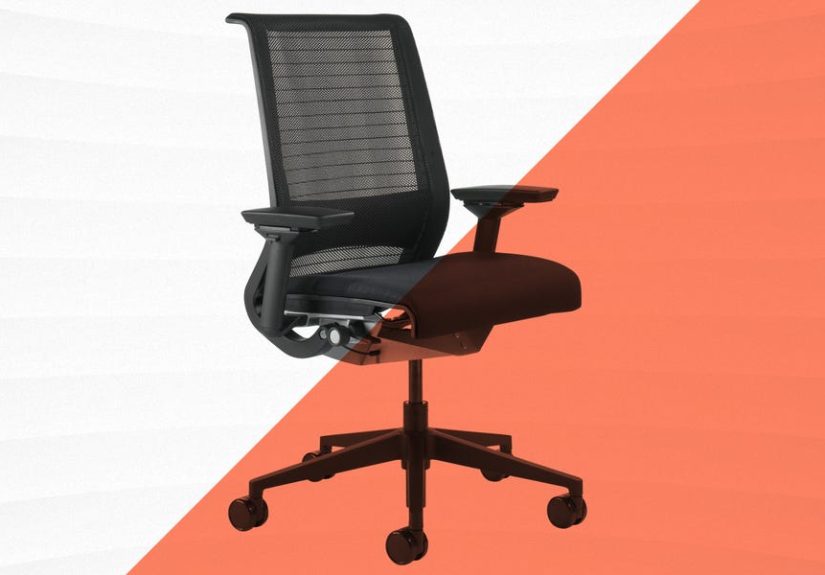
#1 Steelcase Gesture Best Overall for Modern, Multi-Device Postures
The Steelcase Gesture became famous in the WFH era for one reason: it plays nicely with the weird poses people adopt when they’re juggling
a laptop, monitor, phone, and “I’ll just check Slack on the couch for a second” (famous last words).
Why it made the list
- Arms that actually move with you: The Gesture’s arm system is designed to support a wide range of positions (keyboard, mouse, phone, tablet).
- Support while reclining: Its contoured back is built to keep your spine supported as you move and recline, instead of “falling away” from you.
- Big adjustability for many body types: A wide range of fit is helpful when multiple people share a home officeor when your posture changes throughout the day.
Best for
People who work long hours at a computer, switch positions frequently, and want a chair that can be tuned for both upright focus and leaning-back thinking.
Watch-outs
- Premium pricing, especially with upgrades (headrest, upholstery choices).
- It rewards careful setupif you never adjust anything, you won’t get the full value.
#2 Herman Miller Aeron Best Mesh Chair (Especially If You Run Hot)
The Aeron is the mesh chair that became a cultural artifact. In 2021, it kept winning fans because it solves a very real problem:
if you get warm while sitting, thick foam can feel like wearing a winter coat… indoors… in July… while answering emails.
Why it made the list
- Breathable suspension: Mesh-like support helps airflow and can feel cooler than heavily padded seats.
- Multiple sizes: Many chairs are “one size fits most.” Aeron is known for offering multiple sizes, which can improve fit.
- Back support options: Aeron can be configured with different lumbar/posture systems, so you can choose the feel you want.
Best for
Hot sleepers, warm rooms, people who like a springy “suspension” seat feel, and buyers who want a chair that’s engineered like a long-term tool.
Watch-outs
- Some people prefer a cushioned seat feel; suspension can feel “different” at first.
- It’s an investmentconsider whether you want new, used, or refurbished (more on that later).
#3 Steelcase Leap Best for People Who Want a “Dialed-In” Fit
If the Gesture is “best overall,” the Leap is “best for the person who treats chair adjustments like a sport.” The Leap is built around the idea
that your spine doesn’t move as one rigid pieceand the chair’s design tries to keep you supported as you shift.
Why it made the list
- Recline that keeps you connected: The Leap is known for a recline behavior where the seat moves with you, helping you stay closer to your desk.
- Strong back support: Its back design aims to support the full spine while allowing movement.
- Comfortable for many work styles: Great for alternating between typing, reading, meetings, and thinking breaks.
Best for
People who like a traditional ergonomic task chair feel, want lots of usable adjustments, and spend a large chunk of the day seated at a desk.
Watch-outs
- Premium cost, though the used/refurb market can be strong.
- As with many high-end chairs, the “right” configuration matters (lumbar, arms, fabric choices).
#4 Herman Miller Embody Best for Long Sessions and Micro-Movement
The Embody has a reputation for feeling “different” in a good way. Instead of focusing only on one firm lumbar pad, it’s designed to distribute pressure,
encourage subtle movement, and support you through long stretcheslike a marathon chair for people who accidentally do 4-hour focus blocks.
Why it made the list
- Pressure distribution: Embody is built around reducing pressure buildup through a support matrix concept.
- Fine-tuning to your back: Its back design can be adjusted to better match your shape and posture habits.
- Breathable, layered seat feel: It aims for comfort without the “sinking into a couch” effect that can wreck posture.
Best for
People who sit for long hours, want a chair that encourages small posture shifts, and like a modern, engineered feel rather than a “classic task chair” vibe.
Watch-outs
- It’s premium-priced.
- Some people need an adjustment periodthe feel is unique, and setup matters.
#5 Haworth Fern Best Flexible Back Support (Comfort That Moves With You)
The Fern is popular with people who want support that doesn’t feel stiff. Its design is built to flex with movement, which can make it feel more “alive”
compared with chairs that feel like a rigid shell.
Why it made the list
- Wave Suspension feel: Fern is known for a supportive back that flexes as you shift and stretch.
- Edgeless comfort: The back can feel less “hard-framed,” which some people find more forgiving over long days.
- Options that matter: Depending on configuration, you can add lumbar support, headrest, and arm upgrades to match your needs.
Best for
People who change posture often, want a flexible supportive back, and like a chair that feels comfortable without feeling mushy.
Watch-outs
- Configuration affects the experiencedon’t assume every Fern feels identical.
- It sits in premium territory, though it often feels “worth it” if it matches your body.
#6 Haworth Zody Best for Sit-Stand Desks, Forward Leaners, and “Perch” Postures
The Zody earned its place in many 2021 shortlists because it supports more than just one posture.
If you use a sit-stand desk, lean forward to type, or hover between sitting and standing, Zody’s feature set can be a big win.
Why it made the list
- Forward tilt option: Helpful for people who do focused, forward-lean work and want support rather than a slump.
- Asymmetrical lumbar option: Some configurations let you fine-tune support on each sideuseful if your body doesn’t feel perfectly symmetrical (spoiler: it isn’t).
- Practical adjustability: Seat depth, tilt controls, and strong arm options make it adaptable.
Best for
Sit-stand desk users, people who like a forward-lean posture for typing, and anyone who wants a chair that handles “upright focus” especially well.
Watch-outs
- As with Fern, configuration mattersespecially lumbar and arms.
- People who prefer a deep lounge recline may prefer other chairs higher on this list.
#7 Humanscale Freedom Best “Minimal-Buttons” Ergonomic Chair
The Humanscale Freedom is for the person who wants ergonomics but doesn’t want to feel like they’re piloting a small aircraft.
Its pitch is simple: fewer knobs, intelligent recline behavior, and consistent support as you move.
Why it made the list
- Smart recline concept: Designed to support you through recline without requiring constant fiddling.
- Good for frequent posture changes: If you alternate between upright work and leaning back, it can feel smooth and natural.
- Long warranty: Often marketed with a lengthy warranty, which helps justify the premium category.
Best for
People who want a streamlined experience, dislike excessive controls, and still want strong ergonomic support for long workdays.
Watch-outs
- Not everyone loves the “less manual adjustment” philosophy.
- It’s not a budget pickthis is a “buy once, keep forever” style chair for many households.
#8 HON Ignition 2.0 Best Mid-Range Value (Real Ergonomics, More Reasonable Price)
In 2021, the HON Ignition 2.0 hit a sweet spot: it offered recognizable ergonomic featureslike synchro-tilt and a seat sliderwithout demanding
the same wallet sacrifice as top-tier premium chairs.
Why it made the list
- Synchro-tilt + seat slider: These are “grown-up” ergonomic features that help fit a wider range of bodies.
- Adjustable lumbar option: Helpful if you know you need more lower-back support.
- Strong warranty reputation: HON is known for robust warranty coverage across many product lines.
Best for
People who want meaningful adjustability, reliable build quality, and good support, but don’t want to spend premium-chair money unless absolutely necessary.
Watch-outs
- Like many mid-range chairs, the “feel” can be less luxurious than premium models.
- Check the exact configuration (arms, lumbar, casters) so it matches your workspace and floor type.
#9 Staples Hyken (Union & Scale FlexFit) Best Budget-Friendly Ergonomic Starter Chair
Not everyone in 2021 could (or wanted to) spend premium money on a chair. The Staples Hyken became a popular budget pick because it checks several ergonomic boxes
that matter for comfort: mesh breathability, an adjustable headrest, tilt options, and built-in lumbar supportat a price that feels more like a “purchase” than a “life event.”
Why it made the list
- Breathable mesh: Helps keep you cooler than thick foam chairs.
- Adjustable headrest + lumbar: Useful if you want neck support and a more guided lower-back feel.
- Practical features for the price: Tilt lock positions, tension control, and basic ergonomic adjustability.
Best for
Budget shoppers who still want a chair built for desk work (not a decorative accent chair pretending to be helpful).
Great as a first upgrade from “whatever was already in the house.”
Watch-outs
- It won’t feel as refined or as customizable as premium chairs, especially for taller/shorter bodies.
- Budget chairs can be more hit-or-miss in long-term comfortbuy from a place with a reasonable return policy.
How to Dial In Any Ergonomic Chair in 7 Minutes
A pricey chair set up wrong can feel worse than a basic chair set up well. Here’s a simple order of operations.
(Yes, this is the part where your chair becomes less “furniture” and more “equipment.”)
- Seat height: Raise/lower until your feet are flat and you feel stable. If your desk forces your chair too high, use a footrest.
- Seat depth: Slide the seat so you have a small gap between the seat edge and the back of your knees. No gap = pressure. Huge gap = less thigh support.
- Lumbar support: Set it to fill the natural curve of your lower back. If it feels like a fist in your spine, back it off.
- Backrest recline/tension: Set tension so you can recline without “falling,” and lock/limit recline if you prefer a more upright task posture.
- Armrests: Adjust so shoulders stay relaxed, elbows near your sides, and forearms can rest lightly. If armrests force your shoulders up, lower them.
- Monitor + keyboard check: Even the best chair can’t fix a monitor that’s too low or a keyboard that’s too high. Keep screens and inputs in comfortable reach.
- Test drive: Sit for 10 minutes, stand up, sit again. Make micro-adjustments. Your body is the reviewer now.
Common Mistakes That Make a Great Chair Feel Terrible
- Armrests too high: This quietly turns “desk work” into “shrugging contest.”
- Sitting too far forward: Many chairs are designed to support you when your back is against the backrest. Perching defeats the design.
- Seat depth ignored: If your chair has a slider, use it. This is one of the biggest comfort multipliers.
- Recline never used: Reclining isn’t failing. It’s pressure management. Use it strategicallyespecially during calls and reading.
- No movement breaks: Chairs support posture, but bodies still want motion. Small breaks can reduce stiffness and fatigue.
If you have persistent pain (especially numbness, tingling, or sharp discomfort), consider checking in with a qualified health professional.
A chair can help, but it’s not a medical diagnosis in disguise.
New vs. Refurbished: The 2021 Money Move
The 2021 chair market made many people realize something: premium chairs hold value, and there’s a thriving secondary market.
Buying refurbished or used can be a smart way to get top-tier ergonomics for lessespecially if the chair has been professionally cleaned, inspected,
and backed by a warranty from the seller.
When refurbished makes sense
- You want a premium chair (Gesture, Leap, Aeron, Embody) but prefer a lower price.
- You’re okay with cosmetic imperfections if the structure and mechanism are solid.
- You can confirm return terms and warranty coverage in writing.
When new makes sense
- You want a precise configuration (specific arms, lumbar, headrest, casters, upholstery).
- Warranty coverage is a top priority for you.
- You’re sensitive to seat/back “wear-in” and want a fresh feel.
Real-World Experiences: From the Chair Trenches
Ergonomic chair reviews often sound like everyone sits in a perfectly calibrated lab, sipping water, maintaining neutral posture, and never once
curling a foot onto the seat like a gremlin. Real life is messierand that’s exactly why chairs feel different after the honeymoon phase.
A common 2021 experience: the first week feels “weird,” not “amazing.” This is normal. Many people are transitioning from soft couches,
dining chairs, or worn-out hand-me-down seats. When you switch to a chair that actually supports your spine, your body may notice new pressure points
not because the chair is bad, but because you’re no longer collapsing into your old habits. People often report that the best chairs don’t feel like a cloud;
they feel like support you stop thinking about once you’re adjusted correctly.
Another frequent reality: armrests are either your best friend or your sworn enemy. Device-heavy workers (laptop + mouse + phone) often
love highly adjustable arms (like on the Gesture or many premium configurations) because they reduce shoulder tension. But if armrests are too wide,
too high, or too far forward, they can cause neck and shoulder fatigue fast. Many experienced WFH users develop a simple habit: set armrests low enough
that shoulders stay relaxed, then bring them in only as needed for keyboarding or mousing. If armrests don’t cooperate, some people temporarily remove them
or lower them out of the wayespecially when playing instruments, drawing, or doing close desk work.
Heat is another big theme. Mesh chairs like the Aeron (and budget mesh options) win fans in warm climates or homes without strong air conditioning.
People who “run hot” often describe padded chairs as comfortable at first but distracting over time, especially during long work blocks. On the flip side,
some users prefer a cushier seat because suspension seats can feel firm until your body adapts. The most consistent takeaway: comfort isn’t one thingcomfort is
a match between your body, your room temperature, your clothing, and your work style.
Then there’s the under-discussed truth: the chair is only half the equation. In 2021, many people bought great chairs and still felt discomfort,
because the desk and monitor setup stayed the same. A chair can’t fix a monitor that forces you to crane your neck, or a keyboard position that makes you shrug.
People who report the biggest improvements usually change two or three things at once: chair fit + monitor height + a footrest (if needed) + a commitment to small
movement breaks. Even “micro-movements”standing for a sip of water, rolling shoulders, changing recline angle during callsadd up over weeks.
Finally, long-term owners often develop “chair literacy.” They stop judging a chair by the first sit and start judging it by the eighth hour.
Chairs like the Leap, Gesture, Aeron, Embody, Fern, and Freedom tend to shine here: they’re built to support you through posture changes rather than punishing you
for moving. Budget chairs can still be excellentespecially as starter upgradesbut experienced users often notice that premium chairs feel more stable in recline,
more consistent across long days, and more forgiving when your posture isn’t perfect (because nobody’s posture is perfect when the calendar is on fire).
Conclusion: Pick the Chair That Fits You (Not the Hype)
The “best ergonomic office chair” is the one that fits your body, supports your work habits, and stays comfortable on the kind of day when you forget lunch
exists. In 2021, these nine chairs stood out because they combined real ergonomic features with designs that hold up to long hourswhether you want premium,
buy-it-for-a-decade seating or a budget-friendly upgrade that still treats your back with basic respect.
If you’re torn, start with your biggest pain point: heat (Aeron), device-heavy posture (Gesture), precision fit (Leap), micro-movement comfort (Embody),
flexible back support (Fern), forward-lean posture (Zody), minimal-controls recline (Freedom), value adjustability (Ignition 2.0), or budget ergonomics (Hyken).
Then set it up properly. Your chair can’t do the whole job alonebut it can make the job a whole lot easier.







 Close
Close