
Table of Contents >> Show >> Hide
- Why the M4 MacBook Air Matters
- M4 Performance: Fast Without the Drama
- Design: Familiar, Thin, and Still Excellent
- Display Quality: Still a Daily Pleasure
- The 12MP Center Stage Camera Is a Real Upgrade
- Battery Life: Built for Real Days, Not Charger Anxiety
- Two External Displays: A Long-Awaited Fix
- Ports: Good Enough, But Not Generous
- Who Should Buy the M4 MacBook Air?
- 13-Inch vs. 15-Inch: Which M4 MacBook Air Is Best?
- Best Configuration to Buy
- What Could Be Better?
- Experience Section: Living With the M4 MacBook Air Day to Day
- Final Verdict: The Easy MacBook Recommendation
The MacBook Air has always been Apple’s “just right” laptop. Not the flashiest. Not the most expensive. Not the machine you buy because you secretly want to render a Hollywood monster scene while sitting in a coffee shop. It is the Mac you buy because you want a fast, light, reliable computer that does not complain, overheat, roar like a tiny jet engine, or make your backpack feel like it contains a brick with a keyboard.
With the new M4 MacBook Air, Apple has sharpened that formula into something unusually easy to recommend. The design is familiar, the price is better than expected, the base memory finally starts at a sensible 16GB, the webcam has been upgraded to a 12MP Center Stage camera, and the M4 chip gives everyday users more performance than most of them will realistically need. That is not a complaint. Having extra power in a laptop is like having extra snacks on a road trip: you may not need them immediately, but future you will be deeply grateful.
The result is a laptop that feels less like a small update and more like Apple quietly fixing the things that made earlier Air models harder to recommend without a footnote. The M4 MacBook Air is not perfect, but for students, writers, remote workers, business travelers, casual creators, and most home users, it is the MacBook to buy.
Why the M4 MacBook Air Matters
The biggest reason the M4 MacBook Air stands out is simple: value. Apple laptops are not usually described as “bargains” unless someone is comparing them to a yacht, but this model changes the conversation. The 13-inch M4 MacBook Air starts at a lower price than the previous generation did at launch, while still offering better performance and 16GB of unified memory in the base configuration. That alone makes it a much smarter long-term purchase than older entry-level MacBooks with 8GB of RAM.
For years, many buyers had to ask whether the base MacBook Air was enough. The answer was usually, “Yes, but upgrade the memory if you can.” Now the starting configuration is much more practical. Web browsing, Microsoft Office, Google Workspace, Zoom calls, photo editing, light video work, research, writing, streaming, and dozens of open tabs all feel comfortably within the M4 Air’s natural habitat.
The MacBook Air has never been designed to replace a MacBook Pro for heavy 3D rendering, giant video timelines, or professional studio workflows. But the M4 model narrows the gap for everyday creative work. It is fast enough for casual content creators and polished enough for professionals who spend more time in documents, browsers, dashboards, design tools, and meetings than in full-throttle production apps.
M4 Performance: Fast Without the Drama
The Apple M4 chip is the heart of this upgrade. It brings a 10-core CPU design, strong integrated graphics, a 16-core Neural Engine, and improved efficiency. In normal language, that means the laptop feels quick, responsive, and cool-headed. Apps open quickly. Multitasking is smooth. Switching between a browser full of tabs, Slack, email, Spotify, Photos, and a presentation does not feel like asking the machine to perform a circus act.
The best part is that the MacBook Air remains fanless. There is no fan noise because there is no fan. The laptop just sits there silently, doing its work like the calmest person in a group project. For office work, studying, writing, browsing, coding basics, and light creative tasks, that silence is wonderful. It makes the M4 Air feel premium in a way that is hard to explain until you return to a laptop that sounds like it is trying to dry your hair.
Of course, fanless design has limits. If you push the M4 MacBook Air hard for long periods, such as exporting large video projects or running demanding graphics workloads, performance can be less sustained than on a MacBook Pro with active cooling. That is not a flaw so much as a category difference. The Air is built for portability and everyday speed. The Pro is built for people who make processors sweat for a living.
Design: Familiar, Thin, and Still Excellent
Apple did not redesign the M4 MacBook Air, and honestly, it did not need to. The current Air design is still one of the best laptop designs on the market: thin, light, sturdy, minimal, and easy to carry. The 13-inch model is the ultimate grab-and-go option, while the 15-inch version gives you more screen space without becoming a bulky workstation.
The aluminum body feels premium, the keyboard is comfortable, and the trackpad remains one of the best in any laptop. Apple’s trackpads are so good that using many Windows laptop trackpads afterward can feel like trying to sign your name with a potato. The MacBook Air’s large Force Touch trackpad is smooth, accurate, and excellent for gestures.
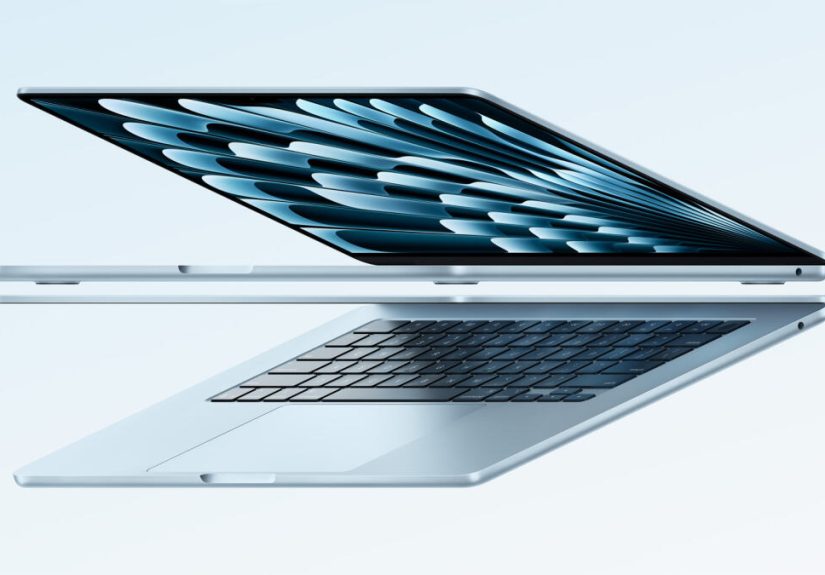
Apple also added a new Sky Blue color option. It is subtle rather than loud, which is very Apple. This is not a neon laptop screaming for attention across the room. It is more like silver took a relaxing vacation by the ocean and came back with better vibes. For buyers who want something fresher than Space Gray or Midnight, Sky Blue is a welcome addition.
Display Quality: Still a Daily Pleasure
The M4 MacBook Air comes in 13.6-inch and 15.3-inch sizes, both using Apple’s Liquid Retina display technology. The screen is bright, sharp, colorful, and excellent for everyday use. Text looks crisp, photos look rich, and video streaming feels more luxurious than it probably has any right to feel on such a thin laptop.
Is it the same as the mini-LED display on the MacBook Pro? No. You do not get ProMotion 120Hz refresh rates or the deep HDR performance of Apple’s Pro models. But for most users, the Air’s display is more than good enough. It is ideal for writing papers, editing photos, watching movies, building slide decks, managing spreadsheets, and pretending you are “just checking one thing” before falling into a 45-minute YouTube rabbit hole.
The 15-inch model deserves special attention for people who want a bigger canvas. It is especially useful if you work with multiple windows, write long documents, edit photos, or simply dislike feeling cramped. The 13-inch model is better for portability. The 15-inch model is better for comfort. Neither is a bad choice.
The 12MP Center Stage Camera Is a Real Upgrade
One of the most practical upgrades in the M4 MacBook Air is the 12MP Center Stage camera. Video calls are now a permanent part of modern life, whether we like it or not. Your laptop camera is no longer an afterthought; it is your digital handshake, meeting room, classroom, and occasionally your “sorry, I was on mute” confession booth.
The new camera improves sharpness and framing, while Center Stage helps keep you centered during calls. It is especially useful if you move around slightly, shift in your chair, or reach for coffee with the urgency of someone trying to save a collapsing civilization. The camera also supports Desk View, which can show your workspace from above for demonstrations, sketches, or documents.
For remote workers, teachers, students, consultants, and anyone who spends hours in video meetings, this camera matters more than a benchmark score. A faster chip is nice. Looking less like a mysterious witness in a low-budget documentary is also nice.
Battery Life: Built for Real Days, Not Charger Anxiety
Apple rates the M4 MacBook Air for up to 18 hours of video streaming and up to 15 hours of wireless web use, depending on model and usage. In real life, battery life will vary based on brightness, apps, workload, and how aggressively your browser tabs multiply when no one is watching. Still, the Air remains one of the best laptops for people who hate carrying chargers everywhere.
This is one of the biggest quality-of-life advantages of Apple silicon. You can start the day with a full battery, work through classes or meetings, write, browse, stream, and still have power left. For travelers, students, and coffee shop workers, that freedom is huge. You are no longer the person scanning the room for outlets like a detective at a crime scene.
The M4 Air also supports MagSafe charging, which is still one of Apple’s smartest laptop features. If someone trips over your charging cable, the connector pops away instead of launching your MacBook into an expensive gymnastics routine. That alone deserves applause.
Two External Displays: A Long-Awaited Fix
One of the most welcome improvements is support for up to two external displays in addition to the built-in display. Earlier MacBook Air models had more restrictive external monitor support, which frustrated desk-based users who loved the Air’s portability but wanted a more serious workstation setup at home or in the office.
With the M4 MacBook Air, you can connect two external displays while still using the laptop screen. That makes the Air much more flexible for productivity. Writers can keep research on one monitor and a draft on another. Analysts can spread spreadsheets, dashboards, and reports across multiple screens. Students can watch lectures while taking notes. Remote workers can keep a meeting open on one display and actual work on another, which is healthier than stacking windows like digital pancakes.
This change makes the M4 MacBook Air feel less like a secondary computer and more like a true main machine. It can be your travel laptop during the day and your desktop replacement when docked at a desk.
Ports: Good Enough, But Not Generous
The MacBook Air still keeps things minimal: two Thunderbolt 4 ports, MagSafe charging, and a headphone jack. For many users, that is fine. Cloud storage, wireless accessories, AirDrop, Bluetooth headphones, and USB-C devices make the port situation manageable.
However, if you regularly use SD cards, HDMI, Ethernet, or multiple USB accessories, you will probably want a hub or docking station. This is one of the clearest reasons to consider a MacBook Pro instead. The Air is sleek and simple, but it is not a port party. It is more like a tasteful dinner with two chairs and a strict guest list.
Still, for most buyers, the port selection is not a dealbreaker. It is just something to plan around. A good USB-C hub can solve most problems, and the addition of better external display support makes the M4 Air far more desk-friendly than before.
Who Should Buy the M4 MacBook Air?
Students
The M4 MacBook Air is one of the best laptops for students because it is light, fast, quiet, and has excellent battery life. It is powerful enough for research, writing, presentations, coding basics, creative projects, and online classes. The 13-inch model is especially easy to carry between classes.
Remote Workers and Professionals
If your work lives in email, documents, spreadsheets, browser apps, project management tools, and video meetings, the M4 Air is almost ideal. It is powerful without being bulky, and the improved camera makes it better for daily calls.
Writers and Bloggers
For writers, the MacBook Air is a dream machine. The keyboard is comfortable, the screen is sharp, the battery lasts, and the laptop is silent. Whether you are writing blog posts, scripts, newsletters, essays, or a novel you swear you will finish this year, the M4 Air is a dependable creative companion.
Casual Creators
Photo editing, short video edits, podcast management, Canva projects, social content, and light design work are all well within the M4 Air’s comfort zone. If you are a full-time video editor or 3D artist, step up to a Pro. But if you create content casually or semi-professionally, the Air has plenty of muscle.
13-Inch vs. 15-Inch: Which M4 MacBook Air Is Best?
The 13-inch M4 MacBook Air is the one to buy if portability is your top priority. It is lighter, easier to carry, and perfect for students, commuters, travelers, and anyone who works from different places. It is also the most affordable model, making it the best overall value.
The 15-inch M4 MacBook Air is the better choice if you want more screen space and do not mind a slightly larger laptop. It is excellent for people who work long hours on one machine and want more breathing room for documents, editing, multitasking, or entertainment. It gives you that “big laptop” feeling without the weight and cost of a MacBook Pro.
For most people, the 13-inch model is the sweet spot. For people who value comfort over compactness, the 15-inch model is worth the extra money.
Best Configuration to Buy
The base M4 MacBook Air is finally a strong recommendation because it includes 16GB of unified memory. That is a major win for long-term usability. For many buyers, the base 13-inch model with 16GB memory and 256GB storage will be enough, especially if they use cloud storage.
However, storage is where you should think carefully. A 256GB SSD can fill quickly if you store photos, videos, games, large apps, or offline media. If your budget allows, upgrading to 512GB storage is the most practical improvement. Memory upgrades to 24GB or 32GB are useful for heavier multitasking and creative workflows, but many everyday users will be perfectly happy with 16GB.
The best balanced configuration for most buyers is likely 16GB memory with 512GB storage. It keeps the price reasonable while giving the laptop more room to age gracefully.
What Could Be Better?
No laptop is perfect, even one with an Apple logo polished enough to reflect your financial decisions. The M4 MacBook Air still has limited ports. The display is excellent, but it does not have 120Hz ProMotion. Storage upgrades can be expensive. The fanless design is silent but not ideal for long, heavy workloads. And Face ID would be lovely on a MacBook, yet Apple continues to act as if laptop faces are a mysterious frontier.
Gamers should also be realistic. Apple silicon has improved Mac gaming, and some titles run well, but Windows laptops still offer broader game support. If gaming is your main priority, the M4 MacBook Air is not the obvious pick. If gaming is occasional and productivity matters more, it is fine.
These drawbacks are real, but none of them ruin the laptop for its intended audience. The Air is not trying to be everything. It is trying to be the best everyday laptop for the largest number of people. At that, it succeeds beautifully.
Experience Section: Living With the M4 MacBook Air Day to Day
Using the M4 MacBook Air feels less like using a “new gadget” and more like removing friction from your day. That may sound boring, but boring reliability is underrated. The laptop wakes instantly, unlocks quickly with Touch ID, and is ready before your brain has finished deciding whether today is a coffee day or a double-coffee day.
For writing and research, the M4 Air is especially satisfying. You can keep a dozen browser tabs open, run a notes app, stream music, check email, and jump into a video call without the machine feeling strained. The keyboard has a stable, crisp feel that makes long typing sessions comfortable. The screen is sharp enough that text remains easy to read for hours, which matters when you are editing a long article and questioning every comma like it personally betrayed you.
The quietness is another daily luxury. Because there is no fan, the laptop never suddenly spins up during a meeting or late-night work session. That silence makes the Air feel calm and focused. It is easy to use in libraries, classrooms, bedrooms, shared offices, and cafes. You notice the lack of noise most when you switch back to another laptop and wonder why it is auditioning for airport runway duty.
Portability is where the MacBook Air continues to shine. The 13-inch model slips easily into a backpack and is light enough to carry all day. The 15-inch version is larger, but still impressively slim for the amount of screen space it offers. Both models make it easy to work from a desk, couch, airport lounge, classroom, or kitchen table. The Air does not demand a dedicated setup. It adapts to wherever you happen to be productive, or at least wherever you are pretending to be productive.
The battery life changes how you use the laptop. Instead of planning around outlets, you simply open the lid and work. For students, that means taking notes through multiple classes. For travelers, it means writing or watching videos on a flight. For remote workers, it means moving around the house without carrying a charger like life support equipment. When you do need to charge, MagSafe makes the process simple and safer.
The improved webcam also makes a bigger difference than expected. On video calls, the image looks cleaner and more modern, while Center Stage keeps you framed naturally. If you teach online, join client calls, attend remote classes, or present regularly, this upgrade is not just cosmetic. It makes the laptop feel built for the way people actually work now.
Docked at a desk, the M4 MacBook Air becomes even more convincing. The ability to run two external displays while keeping the built-in screen active makes it far more capable as a primary computer. You can plug it into a monitor setup, connect a keyboard and mouse, and have a clean workstation during the day. Then, when it is time to leave, you unplug one cable and take the same machine with you. That flexibility is exactly why the Air is so appealing.
After extended everyday use, the main impression is balance. The M4 MacBook Air is not the most powerful Mac, but it is powerful enough. It is not the cheapest laptop, but it offers strong value. It is not packed with ports, but it is easy to expand. It is not radically redesigned, but the design still works. In a world full of laptops trying to look futuristic, the M4 Air wins by being practical, polished, and pleasant every single day.
Final Verdict: The Easy MacBook Recommendation
The M4 MacBook Air is the one to buy because it gets the fundamentals right. It is fast, light, quiet, long-lasting, beautifully built, and now better equipped at the base level. The lower starting price and 16GB standard memory make it a much stronger value than previous Air models, while the 12MP Center Stage camera and improved external display support solve real-world problems.
Most people do not need a MacBook Pro. They need a laptop that feels fast today and still feels capable several years from now. They need something portable enough to carry, comfortable enough to use for hours, and dependable enough that it fades into the background while they work, study, create, and relax.
That is exactly what the M4 MacBook Air delivers. It is not just Apple’s best everyday laptop. It is one of the easiest laptop recommendations on the market.







 Close
Close