Table of Contents >> Show >> Hide
- What Google Maps in Space Actually Lets You Do
- Why Exploring Space Through a Map Feels So Different
- The Best Worlds to Visit First
- Mercury: The Sun’s Overachieving Little Neighbor
- Venus: Beautiful, Terrifying, and Absolutely Not Vacation-Friendly
- Mars: The Headliner Everyone Understandably Loves
- Europa and Ganymede: Jupiter’s Moons Steal the Scene
- Titan and Enceladus: Saturn’s Weird and Wonderful Family
- Pluto: Still a Crowd Favorite, Demotion Be Damned
- How Google Maps Turns Raw Science Into a Travel Experience
- Google Maps Is Not the Only Tool, but It May Be the Most Welcoming One
- Tips for Getting More Out of the Experience
- Why This Matters More Than It Seems
- Experiences Related to Exploring the Solar System with Google Maps
- Conclusion
Most people use Google Maps to find tacos, gas stations, or the one coffee shop that somehow has both oat milk and emotional support lighting. But if you zoom out far enough, Google Maps stops being a tool for traffic and starts behaving like a surprisingly fun spaceship window. Suddenly, your next stop is not downtown. It is Titan. Or Europa. Or Pluto, which is still having an identity crisis but remains spectacular anyway.
If you have never tried Google Maps in Space, you are missing one of the internet’s most delightfully nerdy hidden features. It turns the solar system into something you can browse with the same instincts you use to explore a new city. You pan, zoom, click landmarks, and hop between worlds as if interplanetary travel were merely a browser tab away. No rocket fuel required. Just curiosity, a laptop, and perhaps a willingness to gasp at giant canyons before breakfast.
This is what makes the experience special: Google Maps does not just show planets and moons as textbook circles with labels. It invites you to explore the solar system with Google Maps the way a traveler explores a place. You are not memorizing facts. You are wandering. And wandering, as it turns out, is a very effective way to fall in love with astronomy.
What Google Maps in Space Actually Lets You Do
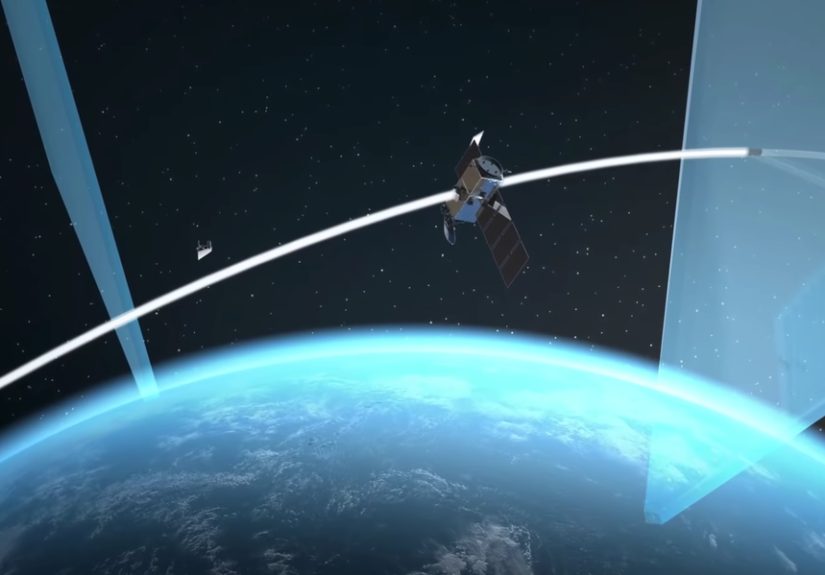
At its core, Google Maps in Space is a desktop-based experience that lets users view a range of celestial objects, including planets, moons, and even the International Space Station. Once Globe View is enabled, the interface becomes a kind of virtual atlas for outer space. Instead of zooming from your neighborhood to another state, you zoom from Earth toward the Moon, Mars, Mercury, Venus, and a growing cast of fascinating cosmic neighbors.
The beauty of the feature is its simplicity. You do not need a PhD in planetary science to enjoy it. You can click into different destinations from a sidebar, move around the globe, and open landmarks for more context. In that sense, Google Maps lowers the intimidation factor that often comes with space content. It says, in effect, “Come on in. The vacuum is fine.”
That accessibility matters. Space is vast, abstract, and frankly rude in its refusal to fit inside normal human expectations. Google Maps gives it shape. It turns impossible distances into explorable surfaces. The result feels less like reading about astronomy and more like participating in it.
Why Exploring Space Through a Map Feels So Different
There are countless websites that explain the planets and moons of our solar system. There are videos, classroom diagrams, and excellent NASA mission pages. But maps do something those formats do not always do well: they teach scale, terrain, and relationship. A map lets you see where things are, how features connect, and why one region looks dramatically different from another.
That is especially useful in a solar system filled with worlds that are not generic balls of rock. Mercury is scarred and cratered. Venus is smothered by a brutal atmosphere. Mars has ancient river valleys and dust-covered plains. Europa looks like frozen glass that somebody cracked with divine frustration. Titan has lakes, but not the kind you would ever want to cannonball into. Pluto, meanwhile, looks like it hired a surrealist interior designer.
By giving these places surfaces that you can actually move around, Google Maps transforms distant science into spatial understanding. It is one thing to hear that Mars once had water. It is another to browse a mapped landscape and think, “Oh. This place had stories.”
The Best Worlds to Visit First
Mercury: The Sun’s Overachieving Little Neighbor
Mercury is easy to underestimate. It is the smallest planet in the solar system and often gets overshadowed by flashier worlds with rings, storms, or possible alien oceans. But on a map, Mercury is a show-off. Its cratered face looks ancient and unforgiving, like the moon after a very long, very difficult week. Exploring Mercury in Google Maps is a reminder that even the smallest planet can deliver dramatic geology.
It also helps that Mercury is scientifically interesting. NASA’s MESSENGER mission revealed important details about its surface composition, magnetic field, and even water ice in permanently shadowed polar regions. So yes, the closest planet to the Sun still found a way to keep some ice. Space loves irony.
Venus: Beautiful, Terrifying, and Absolutely Not Vacation-Friendly
Venus may look calm from a distance, but it is the solar system’s queen of bad hospitality. It is hotter than Mercury despite being farther from the Sun, thanks to a runaway greenhouse effect. Mapping Venus is fascinating precisely because the surface tells a story hidden beneath thick clouds. On Google Maps, Venus becomes less of a bright dot in the sky and more of a real place with topography, texture, and geologic personality.
That shift is important for readers and students alike. It turns Venus from trivia into terrain.
Mars: The Headliner Everyone Understandably Loves
If Google Maps in Space has a celebrity destination, it is Mars. And Mars earns the hype. It is the most explored planet beyond Earth, the only one where humans have sent rovers to drive around and report back. When you browse Mars on a map, you are looking at a world that once had wetter, warmer conditions, and still holds clues about ancient habitability.
Mars works beautifully in a map interface because it feels both alien and strangely familiar. It has volcanoes, valleys, impact craters, dunes, and polar ice. You can imagine routes, regions, and missions. Suddenly, the red planet stops being a symbol of “future colonization” and starts becoming what it actually is: a place with a rich physical history.
Europa and Ganymede: Jupiter’s Moons Steal the Scene
Jupiter may be the largest planet in the solar system, but its moons are the real map nerd bait. Europa is especially compelling because scientists believe it hides a saltwater ocean beneath its icy shell, possibly containing more water than all of Earth’s global ocean combined. On a map, Europa’s cracked surface looks like an elegant disaster. It is gorgeous and eerie, which is basically the ideal aesthetic for a moon that might hold the ingredients for life.
Ganymede deserves attention too. It is the largest moon in the solar system, bigger than Mercury, and has a personality all its own. Exploring these moons through Google Maps gives users a clearer sense of why astronomers obsess over “ocean worlds.” These are not just side characters orbiting Jupiter. They are major destinations in humanity’s search for habitable environments beyond Earth.
Titan and Enceladus: Saturn’s Weird and Wonderful Family
Saturn’s moons are where the solar system starts flexing its creativity. Titan has lakes and seas of liquid methane and ethane. Enceladus shoots water-rich plumes into space from beneath an icy crust. Neither of these places resembles Earth in a comfortable way, but both are irresistible to scientists.
Google Maps makes that fascination more immediate. Titan feels mysterious and moody. Enceladus feels fragile but active, a tiny frozen world with a surprisingly dynamic interior. These are exactly the kinds of destinations that benefit from map-based exploration because their significance lies in the details of their surfaces and regions, not just in their names on a diagram.
Pluto: Still a Crowd Favorite, Demotion Be Damned
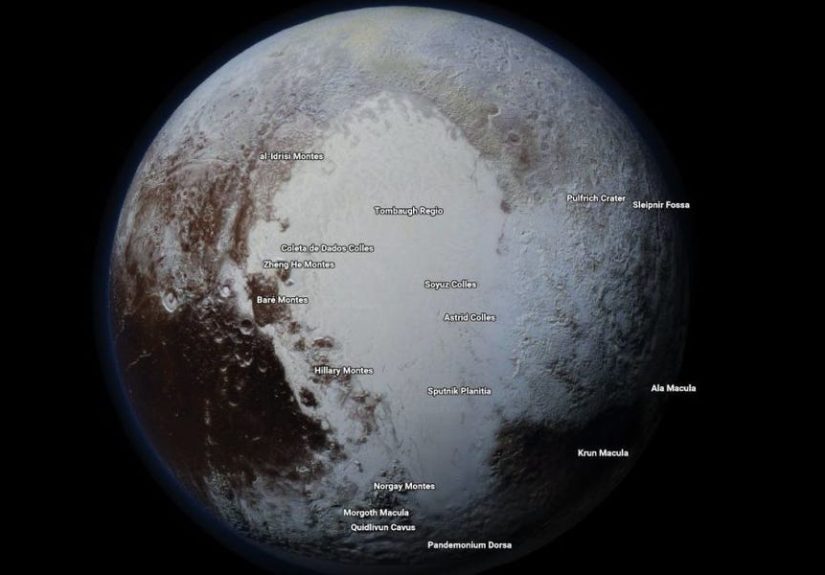
Pluto’s reclassification to dwarf planet did not hurt its popularity one bit. If anything, it made Pluto the underdog hero of astronomy. Thanks to New Horizons imagery, Pluto is no longer a fuzzy speck in the public imagination. It has recognizable terrain, including the famous heart-shaped Tombaugh Regio, mountain ranges, plains, and dramatic contrasts in color and texture.
Exploring Pluto with Google Maps is one of the best examples of why this feature works. It gives a remote world emotional immediacy. Pluto feels less like a debate and more like a destination.
How Google Maps Turns Raw Science Into a Travel Experience
One reason this feature feels so compelling is that it sits at the intersection of technology, cartography, and storytelling. Google’s expansion into planetary mapping used real spacecraft imagery, including large amounts of data from Cassini, plus contributions based on NASA and European Space Agency observations. That means the map experience is not fantasy dressed up as science. It is science translated into a form people intuitively know how to use.
That translation is powerful. Humans understand maps. We have used them for centuries to shrink impossible distances into understandable space. The same instinct that once helped people trace coastlines and trade routes now helps them inspect craters on Mercury and fractured ice on Europa. In a way, Google Maps in Space is part of a much older tradition: turning the unknown into something navigable.
It also shows how modern space exploration depends on visual interpretation. Missions gather data, but maps make that data legible to the public. They help non-specialists understand why one ridge matters, why one basin is unusual, or why one moon has scientists practically vibrating with excitement.
Google Maps Is Not the Only Tool, but It May Be the Most Welcoming One
If you want deeply technical, mission-rich exploration, NASA’s tools are fantastic. Eyes on the Solar System offers immersive 3D context. Mars Trek gives users access to serious mapping and analysis layers. USGS Astrogeology provides a treasure chest of planetary maps and geologic products. Those resources are excellent for research, education, and anyone who enjoys clicking buttons labeled things like “raster datasets” without fear.
But Google Maps has a different superpower. It is welcoming. It does not ask users to become experts before they begin. It invites them to browse first and learn second. That may sound casual, but it is exactly how lifelong curiosity often starts.
Tips for Getting More Out of the Experience
- Use a desktop computer. The space features work best there, especially when Globe View is turned on.
- Start with familiar names. Mars, the Moon, and Pluto are easy entry points before you move into moon-heavy rabbit holes.
- Compare worlds side by side. Jumping from Mercury to Titan to Europa makes the solar system’s diversity hit much harder.
- Click landmarks and named regions. The names turn scenery into story.
- Pair Google Maps with NASA resources. Browse the map first, then read the mission science for context. It is the academic version of getting dessert after dinner.
Why This Matters More Than It Seems
At first glance, exploring planets on Google Maps sounds like a fun gimmick. And yes, it is fun. But it is also part of a bigger shift in how science reaches the public. Interactive tools do more than entertain. They create memory. People remember what they discover for themselves, especially when discovery feels playful.
For teachers, students, writers, and curious readers, this feature offers a better way to think about the solar system exploration story. We are no longer limited to flat textbook snapshots. We can browse real mapped surfaces built from actual mission data. That changes the emotional texture of learning. Space feels less like a chapter and more like a place.
Experiences Related to Exploring the Solar System with Google Maps
One of the most interesting things about exploring the solar system with Google Maps is how quickly it changes your mood. You may open the site out of mild curiosity, maybe because you saw a social media post or because you were trying to avoid answering emails for five blessed minutes. Then, without warning, you are hovering above a moon of Saturn, staring at a surface that looks like it belongs in a science-fiction film directed by someone with excellent taste in lighting.
The experience feels oddly personal. On Earth, maps are practical. They help us get somewhere. In space, maps become emotional. They remind us how big the universe is, but they also make it feel reachable. You are still sitting in a chair, possibly wearing socks that do not match, yet your brain starts acting like you have become a tiny cartographer of the cosmos. There is something thrilling about that shift.
For many people, the first emotional punch comes from scale. You jump from Earth to Mars and instantly realize that “planet” is not a generic category. These worlds are wildly different. Mars feels dusty and dramatic. Europa feels cold and secretive. Titan feels like the kind of place that would swallow your flashlight beam and then charge admission for the privilege. Moving through them one after another creates a kind of planetary whiplash, but in the best way.
Another memorable part of the experience is the feeling of recognition. Before tools like this, many people knew celestial bodies by name only. They had heard of Mercury, Pluto, or Enceladus, but those places were abstract nouns. Once mapped, they become memorable landscapes. You start noticing patterns, scars, ridges, cracks, and basins. You may not remember every scientific term, but you remember the feeling of seeing them. That matters. Curiosity often begins with visual attachment.
There is also a quiet educational magic in the way Google Maps encourages self-directed learning. You are not being marched through a slideshow. You are choosing where to go next. That freedom makes the experience stickier. A student who clicks from the Moon to Ganymede out of pure curiosity may end up reading about ice shells, subsurface oceans, crater density, or why scientists are so interested in worlds that look frozen on the outside but active underneath. It is the gateway drug of planetary science, except legal and much better for homework.
Even adults who think they are “not into space” often get hooked once the exploration becomes spatial. A world with named regions and visible terrain feels real in a way a paragraph cannot always achieve. It becomes easier to imagine spacecraft missions, future discoveries, and the long human effort behind every pixel. That sense of connection can be surprisingly moving. You are not just looking at pretty spheres. You are looking at places humanity worked very hard to understand.
In the end, the most lasting experience is not just awe. It is perspective. Exploring the solar system with Google Maps makes Earth feel both small and precious. After hopping across icy moons, inferno planets, and distant dwarf worlds, home starts to look wonderfully improbable. That may be the feature’s greatest hidden gift. It sends you outward, but it also brings you back with better eyes.
Conclusion
Explore the Solar System with Google Maps is more than a clever headline. It is a genuinely engaging way to turn space from an abstract concept into a browsable experience. Whether you want to admire Pluto’s strange beauty, inspect the cracked ice of Europa, or wander Mars without dealing with dust in your shoes, Google Maps in Space offers one of the easiest and most enjoyable entries into planetary discovery.
It may not replace NASA’s technical tools, and it is not meant to. Its job is different. It makes the solar system approachable, visual, and fun. In a world where attention is constantly being stolen by notifications, that is no small achievement. Sometimes the best way to get people excited about science is not to lecture them. It is to hand them a map and let them roam.