
Table of Contents >> Show >> Hide
- Why the Pixel 6 Wasn’t Just a Phone Launch
- Tensor: The Chip Built for the Stuff You Actually Do
- A Camera Hardware Reset (Finally) and Why It Matters for Android
- Android 12 and Material You: Pixel as the “Default Android” Again
- Privacy and Security: The Pixel 6 as a Trust Statement
- Pricing and Positioning: A Not-So-Subtle Challenge to the Android Status Quo
- The Pixel 6’s Growing Pains (Because Reinvention Isn’t a Spa Day)
- So… Could Google Really Reinvent Android With Pixel 6?
- Neat Wrap-Up: The Pixel 6 as Android’s Blueprint Phone
- Real-World Experience: What Living With the Pixel 6 Tells Us About Android’s Future
Android has always been the world’s most popular “choose-your-own-adventure” smartphone story. Want a phone that looks like a spaceship? There’s an Android for that. Want one that comes with three preinstalled weather apps and a digital assistant that’s slightly too eager? Oh, absolutely.
But that freedom comes with a cost: Android can feel less like a single platform and more like a neighborhood potluck where everyone brought their own casserole… and no one agrees on what “spicy” means. The Pixel 6 arrived as Google’s bold attempt to host the potluck, label the dishes, and quietly replace the mystery casserole with something actually delicious.
The big idea wasn’t just “here’s another Pixel.” It was: “What if Google stopped merely supplying the operating system and started shaping the whole experiencehardware, software, AI, security, updates, and the little details you only notice after six months?” If Android could be reinvented from the inside out, the Pixel 6 was a serious first draft.
Why the Pixel 6 Wasn’t Just a Phone Launch
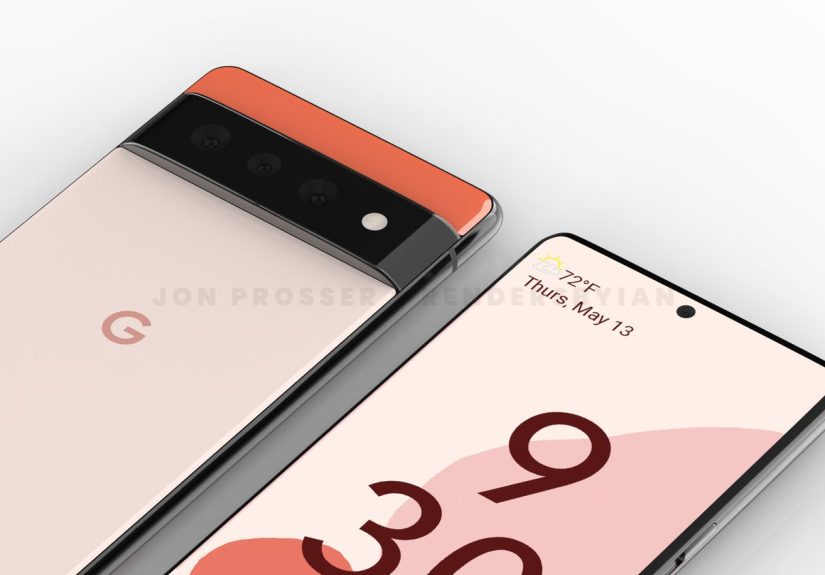
Pixel phones used to feel like Google’s “reference devices”clean Android, great cameras, and a vibe that said, “I know what an APK is.” The Pixel 6 changed the tone. It looked different (hello, camera bar), priced aggressively, andmost importantlyintroduced Google Tensor, Google’s first custom system-on-a-chip for Pixel.
That move matters because Android’s identity has long been shaped by a triangle: Google makes the OS, chip makers provide the engine, and phone brands customize the body kit. The Pixel 6 nudged Android closer to an “integrated” model where Google can tune the whole machine, not just write the dashboard software.
Tensor: The Chip Built for the Stuff You Actually Do
Traditional smartphone marketing loves a good benchmark chart. Tensor’s story was different. The point wasn’t to win every speed race; it was to make the phone feel smarter in ways you can notice without opening a spreadsheet.
By designing its own silicon, Google could prioritize on-device machine learningespecially for the things Google is unusually good at: language, photos, and context. That’s a subtle but important shift in Android’s evolution. It suggests the platform’s next leap isn’t “faster scrolling,” but “more helpful computing.”
AI Features That Feel Like Magic (Until You Remember It’s Math)
On the Pixel 6, “AI” wasn’t just a buzzword floating around the keynote like confetti. It showed up in practical features: faster speech recognition, smarter photo processing, and real-time tools that didn’t need to ship your data to a server farm before you could finish your sentence.
The headline crowd-pleasers were camera tricks like Magic Eraser and Face Unblurfeatures that aim to rescue photos from the two greatest threats to modern photography: strangers in the background and your friends refusing to hold still for 0.8 seconds.
But the more “Android-reinventing” part is what Tensor implies: Google can build platform features that lean on custom hardware, then standardize that approach across future Pixelsand potentially influence where Android as a whole heads next.
Voice Typing, Translation, and the Quiet Revolution of “Less Friction”
Pixels have long been good at Assistant features, call screening, and transcription. With Tensor, Google doubled down on the idea that the phone should understand you with fewer retries. Better voice typing isn’t flashy in a commercial, but it changes daily life: fewer corrections, faster replies, and less time arguing with autocorrect like it’s a coworker who “just wants to circle back.”
Live translation tools fit the same theme. If your phone can translate conversations or messages quickly, the platform becomes more universally usefulnot because it has more menus, but because it reduces barriers in the real world. That’s an Android win that doesn’t depend on your launcher skin.
A Camera Hardware Reset (Finally) and Why It Matters for Android
For years, Pixel cameras punched above their weight with computational photography. The Pixel 6 finally paired that software strength with a major camera hardware upgrademost notably a larger main sensor. This wasn’t just a nicer spec sheet; it was Google admitting that great photography needs both brains and eyes.
The result was a camera system designed for modern expectations: better low-light performance, more detail, and new motion features that simulate techniques you’d normally need patience (and maybe a tripod) to pull off.
Computational Photography as a Platform Strategy
When Google builds camera features on top of Tensor, it’s doing more than improving one phone. It’s creating a blueprint: on-device processing that’s fast enough to feel instant, smart enough to improve outcomes, and private enough to be comfortable.
If Android wants to stay competitive with iPhone-level polish, this is one of the clearest paths: make the default camera experience so good that people stop asking, “Which Android takes the best photos?” and start assuming, “Android cameras are just excellent now.”
Android 12 and Material You: Pixel as the “Default Android” Again
The Pixel 6 launched alongside Android 12, which introduced one of Android’s most dramatic visual shifts in years: Material You. The core idea was personalization at scaleyour wallpaper influences the system colors, creating a UI that feels tailored without you manually picking accent shades like you’re painting a guest room.
This matters for reinvention because it reframes Android design. Instead of every phone brand inventing its own design language (often loudly), Google pushed a cohesive style that could spread across the ecosystemespecially as manufacturers and developers adopt the same dynamic color and theming APIs.
Personalization Without the Chaos
Android personalization used to mean “change everything,” which sometimes produced results that looked like a website from 2009 discovered glitter. Material You aimed for a different vibe: consistent layout, bigger touch targets, friendlier motion, and color that adapts naturally.
It wasn’t universally lovedbig changes never arebut it established a modern Android identity that felt unmistakably Google. And if the Pixel 6 was meant to be Android’s reference point again, Android 12 helped by making the Pixel experience feel distinct, not generic.
The Honest Footnote: Reinvention Comes With Rough Edges
Early Android 12 builds on Pixel 6 also reminded everyone that “fresh paint” can still be drying. Reviewers noted occasional bugs and odd UI hiccups that made the software feel a bit unfinished at launch. That’s not unusual in tech, but it’s relevant here: if Pixel is meant to be the gold standard, it has to feel reliably “done,” not just ambitious.
Privacy and Security: The Pixel 6 as a Trust Statement
Google has to live in two worlds at once: it’s a company built on data-driven ads, and it’s also trying to sell premium hardware to people who increasingly care about privacy. The Pixel 6 made a strong pitch that those goals can coexistat least on the device.
Android 12 added clearer privacy controls like dashboards and indicators, while Pixel 6 brought deeper hardware-level security with Titan M2 and Tensor’s security architecture. Taken together, it was Google saying: “We want Android to be the platform you can trust, not just customize.”
Titan M2 and Hardware-Backed Protection
Titan M2 is the kind of feature you never “enjoy” the way you enjoy a great camera shotbut it’s foundational. It supports stronger key storage and device integrity protections. In plain terms: it helps keep your phone harder to mess with, even if an attacker gets clever.
Google also emphasized rigorous security testing around the Pixel 6 era, including internal efforts to break the device before it reached consumers. That’s not a marketing flex so much as a necessity when you’re introducing new silicon and new security components at the same time.
Pricing and Positioning: A Not-So-Subtle Challenge to the Android Status Quo
The Pixel 6 launched at a price that undercut many flagship rivals while still offering premium ambitions. That’s strategic. If Google wants Pixel to shape Android’s future, it can’t be a niche device for enthusiasts onlyit needs volume, mindshare, and a presence in everyday upgrade conversations.
A more accessible price also sends a message to the broader Android ecosystem: the “best Android experience” doesn’t have to be locked behind a four-digit price tag. When Google plays aggressively on value, it pressures competitors to justify their premiums with more than just brand inertia.
The Pixel 6’s Growing Pains (Because Reinvention Isn’t a Spa Day)
If the Pixel 6 was Google’s reinvention vehicle, it also came with a few “prototype energy” moments that reminded everyone this wasn’t Android’s final form.
- Fingerprint unlocking: The in-display fingerprint reader drew criticism for being slower and less consistent than older rear-mounted sensors.
- Charging speed: Despite support for fast charging, real-world charging behavior could feel conservativeespecially past 80%.
- Software maturity: Android 12’s bold redesign occasionally brought launch-era quirks and app compatibility annoyances.
- 5G complexity: Certain models and carriers introduced confusion around mmWave availability versus sub-6 5G.
None of these issues erase the Pixel 6’s bigger narrativebut they are part of it. Reinventing Android means raising the bar, and raising the bar means fewer excuses are tolerated.
So… Could Google Really Reinvent Android With Pixel 6?
“Reinvent” is a big word. But the Pixel 6 put multiple reinvention levers in Google’s hands:
- Silicon control: Tensor lets Google build features around on-device AI and ship them as a cohesive experience.
- Design leadership: Material You gave Android a modern identity that could unify the ecosystem without suffocating customization.
- Security as a selling point: Titan M2 plus Android 12 privacy tools helped shift the conversation from “Android is flexible” to “Android is trustworthy.”
- Longer support expectations: Extended update promises (and evolving update delivery models) push Android toward more iPhone-like longevity.
The Pixel 6 didn’t magically make every Android phone feel the same. But it offered something Android has often lacked: a coherent, end-to-end vision from the platform ownerone that could influence hardware trends, app design, and user expectations for years.
Neat Wrap-Up: The Pixel 6 as Android’s Blueprint Phone
The Pixel 6 was Google acting less like a software supplier and more like a product company with a point of view. Tensor wasn’t just a chip; it was a declaration that Android’s future could be built around on-device intelligence, deeper privacy, and an experience that feels intentionally designed.
If Android is a universe, the Pixel 6 was Google planting a flag and saying, “This is how the main timeline should look.” Not everyone has to follow itbut when the platform owner starts making the hardware, the rest of the ecosystem tends to notice.
Real-World Experience: What Living With the Pixel 6 Tells Us About Android’s Future
The Pixel 6 story gets more interesting once you step away from launch day hype and into the messy reality of daily usecommutes, bad lighting, noisy cafés, and that one friend who insists on taking group photos while everyone is mid-blink. Pulling together common reviewer observations and long-term owner feedback, the Pixel 6 feels less like a single product and more like a preview of where Android wants to go.
Day-to-Day Speed: Not the Fastest, But Often the Smoothest
In regular useswiping, multitasking, hopping between appsPixel 6 performance typically lands in the “quietly confident” category. It may not dominate every benchmark, but it’s rarely the bottleneck. That distinction matters because Android’s next wave isn’t just about raw horsepower; it’s about making intelligence feel instant. When voice typing keeps up with your thoughts, and photo processing finishes before you’ve lowered the phone, the experience feels faster even if the numbers aren’t chart-topping.
The Camera in Real Life: More Keepers, Fewer Retakes
The camera is where Pixel 6’s “reinvent Android” ambitions become tangible. The larger sensor helps in tougher lighting, while Tensor-powered features aim to rescue photos that would normally be write-offs. Magic Eraser is the poster child: sometimes it’s spooky-good, sometimes it leaves behind a smear that looks like a ghost tried to escape your vacation photo. But even when it’s imperfect, it changes behaviorpeople actually edit photos because it’s easy and built-in.
Face Unblur-style processing and motion features also encourage a more casual, “just take the shot” approach. You don’t need to baby the camera app. You tap, you trust it, you move on. That’s the kind of friction reduction that turns a feature into a habit.
Voice Typing and Translation: The Sneaky Favorite
Ask many Pixel 6 fans what they miss when they switch phones, and you’ll hear a surprising answer: voice typing. Not because it’s glamorous, but because it’s addictive. When transcription is accurate and punctuation feels automatic, you start dictating messages you would’ve typed, replying faster, and treating your phone more like a helpful assistant than a tiny keyboard with opinions.
Live translation tools fit in the same bucket. Even if you don’t use them daily, the fact that they’re thereand work quicklymakes the device feel more universally capable. It’s Android as a “helpful layer,” not just a set of apps.
The Quirks: Fingerprints, Charging, and the Reality of First-Gen Anything
Real-world use also exposes the Pixel 6’s rough edges. The in-display fingerprint sensor can feel slower than older Pixels with rear sensors, and that friction shows up multiple times a dayexactly when you least want your phone to be dramatic. Charging behavior, especially as the battery nears full, can feel cautious. That’s arguably better for battery health, but it can surprise people who expected a faster “top-up and go” routine.
Software is another reality check. Android 12’s redesign brought personality, but early builds could feel a little rough around the edges. Over time, updates improved stability, and Google’s extended support commitments helped Pixel 6 owners feel less like early adopters stuck in the past. That said, modern Android’s update world is complicated: major OS upgrades matter, but so do behind-the-scenes Play system updates and feature drops, and some reports suggest older devices may not always follow the same monthly cadence forever.
What the Experience Says About Android’s Direction
Put it all together and you get a clear theme: Pixel 6 wasn’t trying to be the most everything. It was trying to be the most helpfulthe phone that reduces little annoyances and upgrades the moments you actually care about (photos, communication, security, personalization). That’s a blueprint for Android reinvention that doesn’t require every manufacturer to copy Pixel’s design. It only requires the ecosystem to accept a new baseline: AI features should feel local and fast, privacy should be visible, and personalization should be cohesive, not chaotic.
If Android’s next era is about integrated intelligence rather than endless settings toggles, the Pixel 6 experiencequirks and alllooks a lot like the opening chapter.







 Close
Close