Table of Contents >> Show >> Hide
- What Is Apple Business Connect (And Why Should You Care)?
- The “Free Reach” Part: What You Can Do in Apple Business Connect
- 1) Claim and polish your Apple Maps Place Card
- 2) Make your listing look trustworthy with a strong cover photo and logo
- 3) Publish promotions and updates with Apple Showcases
- 4) Add action buttons that reduce friction (“Call Now” beats “Let me think about it”)
- 5) Track performance with Insights (so you’re not marketing blindfolded)
- 6) It’s not just for storefronts anymore: support for virtual businesses
- 7) Optional brand trust boosters: Branded Mail (and other identity signals)
- How Apple Business Connect Helps Local SEO (Without Turning Your Brain Into Spreadsheet Soup)
- A Simple Setup Playbook (That Won’t Eat Your Entire Week)
- Specific Examples: What This Looks Like for Real Businesses
- Common Mistakes That Quietly Cost You Customers
- Quick Checklist: The 15-Minute “Make My Listing Better Today” Upgrade
- Conclusion: Free Reach Doesn’t Mean “Automatic”It Means “Available”
- Bonus: Real-World Experience & Lessons (About )
If your business isn’t showing up cleanly in Apple Maps, you’re basically asking iPhone users to play a scavenger hunt
every time they try to find you. And unless you’re running an escape room (in which case… respect), that’s not the vibe.
Here’s the good news: Apple Business Connect is Apple’s free portal that lets you control how your business appears
across the Apple ecosystemespecially in Apple Maps. You can update your Place Card details, add photos,
publish promotions through Showcases, and even see engagement metrics through Insights.
In other words: it’s free reach, sitting right there on people’s iPhones, waiting for you to claim it.
What Is Apple Business Connect (And Why Should You Care)?
Apple Business Connect is a web-based platform where you can manage your official business presence as it appears on Apple services.
Your Place Card is what customers see when they tap your listing in Apple Mapsyour hours, address, phone number,
website, photos, and featured content.
Why care? Because Apple Maps isn’t just a map. It’s a decision engine. People use it while driving (hello, CarPlay),
while walking around downtown, while asking Siri “Where’s the closest…”, and while trying to figure out if your shop is open
right now (spoiler: they will not forgive incorrect hours).
And here’s the behavior shift that makes this matter even more: more consumers are starting local searches directly in map apps,
not traditional search engines. If you’re only optimizing for “Google it,” you’re missing a chunk of intent that’s already in
“take me there” mode.
The “Free Reach” Part: What You Can Do in Apple Business Connect
1) Claim and polish your Apple Maps Place Card
The foundation is simple: make sure your business name, address, phone number, hours, categories, and website are correct and complete.
This sounds basic, but it’s the difference between “new customer” and “angry customer who showed up to a locked door.”
Apple Business Connect also lets you fine-tune how customers find you. One underrated feature: you can precisely position your location
including the entranceso Maps navigates people to the correct spot instead of dumping them behind the building like a confused delivery driver.
If you’re in a mall, a mixed-use complex, or a busy street, this alone can save real sales.
2) Make your listing look trustworthy with a strong cover photo and logo
Apple treats visuals like first-class citizens. Your cover photo and logo form what Apple calls the Place Card headerthe first
impression customers get when they tap your location in Maps (and in Apple Wallet contexts).
Practical strategy: choose a cover photo that answers the customer’s silent question: “What am I looking for when I arrive?”
A restaurant might show the storefront signage. A salon might show the reception area. A service business might use a clean branded image
that signals professionalism. If you manage multiple locations, you can use unique cover photos per location so customers recognize the right place.
3) Publish promotions and updates with Apple Showcases
This is where Apple Business Connect stops being “just a listing” and starts behaving like a marketing channel.
A Showcase is a module on your Place Card designed to highlight something timelynew items, deals, events, seasonal specials,
limited-time offers, you name it.
Each Showcase can include a headline, short body text, an image, and a call-to-action button. You can schedule start and end dates,
run it for short campaigns, or keep it live longer (Apple allows Showcases to run up to a year, with a default duration that encourages
rotating fresh content).
The biggest advantage: people in Apple Maps are already in high-intent mode. They’re not scrolling for entertainment; they’re deciding.
A well-timed Showcase can be the nudge that turns “maybe” into “directions.”
4) Add action buttons that reduce friction (“Call Now” beats “Let me think about it”)
Apple Maps can surface action buttons that let customers do the next thing immediately: call you, get directions, visit your website, share the place,
and more. If multiple actions are available, Apple Maps can preselect one by default, and you can also choose which action to promote.
Translation: you’re not just hoping people remember your business. You’re giving them a one-tap path to become a customer.
For local SEO, friction is the enemy. One tap can be the difference between “booked” and “bounced.”
Pro tip for marketers: Apple notes that action URLs may include analytics parameters. So if you want to measure performance,
you can use tagged URLs (for example, UTM parameters) for your website or campaign landing page to see what Apple Maps traffic does next.
5) Track performance with Insights (so you’re not marketing blindfolded)
Apple Business Connect includes Insights so you can see how customers discover and engage with your listing.
You can review search-related analytics and Place Card interactions, and you can view action tapslike direction requests,
website taps, calls, shares, and other brand actions (such as ordering, reserving, or viewing a menu when available).
This matters because it turns Apple Maps from “set it and forget it” into a channel you can improve. If you notice high direction requests
but low calls, maybe your phone routing is messy. If website taps spike after a Showcase, you’ve got proof that your messaging is working.
6) It’s not just for storefronts anymore: support for virtual businesses
Apple has expanded Business Connect to support businesses that operate without a traditional physical locationonline stores,
service providers, pop-ups, and more. That’s huge for modern brands that sell nationally but still want Apple users to recognize and trust them.
7) Optional brand trust boosters: Branded Mail (and other identity signals)
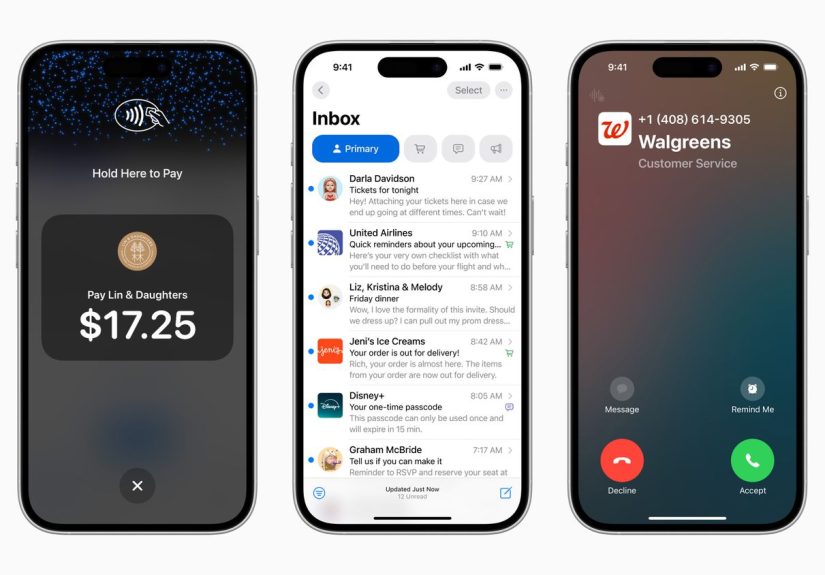
Beyond Maps, Apple Business Connect also supports brand identity features like Branded Mail, where businesses can display their brand name
and logo in Apple’s Mail app to help customers recognize legitimate emails. This is especially valuable in a world where customers assume
every email is either a coupon or a scam (sometimes both).
Branded Mail requires proper domain authenticationApple references DMARC requirementsand it’s intended for commercial domains
(not free consumer email domains). If you already have an IT setup for secure email, this can be a strong trust signal that complements your Maps presence.
How Apple Business Connect Helps Local SEO (Without Turning Your Brain Into Spreadsheet Soup)
It improves “discovery” when intent is highest
A search engine query can be exploratory (“best tacos”). A map app query is often action-oriented (“tacos near me,” then: directions).
Because map app users frequently want a result they can act on immediately, improving your Place Card can lift real outcomes:
calls, visits, and route requests.
It reinforces consistency across platforms
Local SEO fundamentals still apply: consistent business info, accurate hours, and clear categories help customersand platformstrust your data.
Apple Business Connect gives you a direct line to keep that information current, especially during seasonal hours, special events, or relocations.
It makes your brand “feel real” on iPhone
Customers don’t just buy products; they buy confidence. A Place Card with strong visuals, clean details, and a helpful Showcase reads as legitimate.
A Place Card with blurry photos and missing hours reads as “this might be closed forever.”
A Simple Setup Playbook (That Won’t Eat Your Entire Week)
- Sign up and verify your organization in Apple Business Connect (use a company-owned Apple account, not a personal one).
- Claim or add locations, then confirm your listing details: name, category, phone, website, address, and hours.
- Pin the entrance correctly so Apple Maps routes customers to the right spot.
- Upload a strong logo and cover photo, and add additional photos that show what customers will experience.
- Create your first Showcase (seasonal offer, best-seller, limited-time deal) and schedule it.
- Review Insights after a couple of weeks and adjust: photos, Showcase messaging, and which action you promote.
Note: Apple reviews content like photos and Showcases, so don’t treat this like an “upload at 9 AM, launch at 9:01 AM” situation.
Build a small buffer into your marketing calendar.
Specific Examples: What This Looks Like for Real Businesses
Example 1: A neighborhood coffee shop
- Cover photo: storefront + signage so first-timers don’t wander into the dentist next door.
- Showcase idea: “New Winter Latte Flight” with a limited-time CTA to “Get Directions.”
- Action strategy: Promote “Call Now” during pre-order hours; switch to “Get Directions” during peak foot traffic.
- Insight to watch: directions taps by day/time to align staffing and promotions.
Example 2: A salon with online booking
- Photos: clean interior, stations, and a shot that signals the vibe (luxury, friendly, edgy, etc.).
- Showcase idea: “First-time client special” with a booking CTA.
- Insight to watch: website taps and callsif calls are high, booking may be too hard or too hidden.
Example 3: A home services business (HVAC, plumbing, etc.)
- Place Card basics: accurate phone number and service hours (including emergency hours if offered).
- Showcase idea: “Spring tune-up special” with a “Call Now” action.
- Trust play: consistent branding, strong logo, and professional visuals that reassure customers before they invite you into their home.
Example 4: An online-first brand (no storefront)
- Register as a virtual business so Apple users can recognize your brand identity across Apple services.
- Showcase idea: “Free shipping week” or “New drop: limited run” with a website CTA.
- Brand lift: align your Apple presence with email branding efforts for higher trust and recognition.
Common Mistakes That Quietly Cost You Customers
- Wrong hours (the fastest way to earn a one-star vibe without ever getting a review).
- Generic photos that don’t help customers identify the location.
- No Showcase rotationif you never update, you miss a free way to stay relevant in-map.
- No measurementInsights exist so you don’t have to guess.
- Weak calls-to-actiondon’t send users to a homepage when a focused landing page would convert better.
Quick Checklist: The 15-Minute “Make My Listing Better Today” Upgrade
- Confirm hours, phone number, and website are accurate.
- Pick a cover photo that helps customers recognize the location instantly.
- Add 5–10 high-quality photos that reflect what customers actually experience.
- Pin your entrance precisely (especially in complex buildings).
- Create one Showcase for your best offer this month.
- Tag your CTA link for measurement and review Insights later.
Conclusion: Free Reach Doesn’t Mean “Automatic”It Means “Available”
Apple Business Connect is one of those rare marketing opportunities that’s both high-intent and underused. It’s free to set up,
it puts your business in front of customers exactly when they’re trying to go somewhere or contact someone, and it gives you tools
(Showcases, actions, Insights, and brand identity features) to compete with bigger brands without spending bigger-brand money.
The play is simple: claim your presence, make it accurate, make it attractive, and keep it fresh. Apple already has the audience.
Apple Maps already has the intent. Your job is to make sure the “tap” turns into a visit.
Bonus: Real-World Experience & Lessons (About )
When businesses start using Apple Business Connect seriously, the first surprise is usually how fast the “small stuff” becomes “big stuff.”
A café updates its hours for a holiday weekend and realizes fewer customers show up to a locked door. A boutique pins the entrance correctly and
stops getting calls that begin with, “I’m here, but I don’t know where ‘here’ is.” The immediate impact isn’t always flashyit’s fewer lost customers,
fewer confused customers, and fewer awkward moments where your listing is basically gaslighting the public.
The second surprise is how much visuals matter inside Maps. Many owners assume photos are a “nice to have.”
In practice, photos answer objections before they become objections. Is there parking nearby? What does the storefront look like?
Does this place feel clean? Is it casual or upscale? A strong cover photo acts like a billboard at the exact moment a customer is deciding
whether to commit. Businesses that swap a generic logo image for a real storefront shot often notice more “direction taps” because customers feel
confident they can actually spot the place.
Showcases tend to be the next “aha.” The businesses that win with Showcases don’t treat them like random announcements.
They treat them like micro-campaigns with one clear job. For example:
- Restaurants: highlight one seasonal item and use a CTA that supports the next step (directions during meal times, website for menus).
- Service businesses: lead with a limited-time offer and a “Call Now” CTA, because that’s how customers buy in urgent moments.
- Retail: promote a new arrival or weekend event, with a CTA to “Get Directions” and photos that show what’s new.
Another pattern: teams that schedule a simple cadenceone updated Showcase each monthbuild momentum. It’s not about constantly posting;
it’s about consistently being relevant. Apple reviews Showcases, so the best operators plan ahead. They treat it like a lightweight editorial calendar:
promotions, product drops, seasonal services, local events. Over time, this creates a “living” listing that feels active and trustworthy.
Finally, Insights change the conversation internally. Instead of arguing based on opinions (“I think Apple Maps doesn’t matter”),
teams start looking at what people actually do: taps for directions, calls, website visits, shares. That data helps you choose better CTAs,
better landing pages, and better offers. In other words, Apple Business Connect doesn’t just boost reachit gives you a feedback loop.
And in marketing, feedback loops are basically cheat codes (the legal kind).