Table of Contents >> Show >> Hide
- What Is Add Yours on Instagram?
- How to Use Add Yours on Instagram
- Can You Use Add Yours in Reels?
- Add Yours vs. Other Instagram Story Stickers
- Pros of Using Add Yours on Instagram
- Cons of Using Add Yours on Instagram
- Best Practices for Add Yours on Instagram
- Ideas for Add Yours Prompts
- What to Do If Add Yours Is Not Showing Up
- Real-World Experiences Using Add Yours on Instagram
- Final Thoughts
Instagram has a talent for turning one tiny sticker into a full-blown trend machine, and Add Yours is a perfect example. One minute someoneht place.
This guide breaks down what the Add Yours sticker does, how to create one, how to join an existing prompt, and where the feature shines or falls flat. You will also get practical tips for creators, brands, and casual users who just want to make their Stories more interesting without looking like they are trying way too hard. That is the sweet spot, after all.
What Is Add Yours on Instagram?
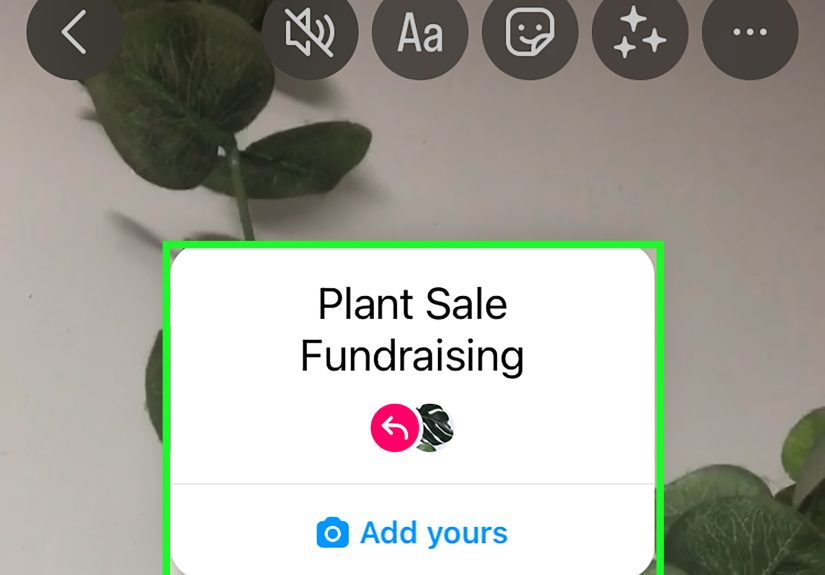
The Add Yours sticker on Instagram is an interactive Story feature that lets you post a prompt and invite other people to respond with their own Story or, in some cases, their own Reel. Think of it as a public chain of participation built around a shared theme. Your prompt could be simple, funny, nostalgic, seasonal, or brand-related, such as “Add your favorite weekend breakfast,” “Show your desk today,” or “Drop your last vacation photo.”
When someone sees your Story and taps the sticker, they can create their own response using the same prompt. That creates a content trail that encourages participation and discovery. For creators and businesses, this is appealing because it can turn passive viewers into active contributors. For regular users, it is just a fun excuse to overshare in an organized way.
Instagram has expanded the Add Yours family beyond the original sticker, too. Depending on your app version and account access, you may also see Add Yours Template and Add Yours Music. These variations make the feature more flexible, especially if you want to guide the visual format or invite music-based responses instead of just a standard Story reply.
How to Use Add Yours on Instagram
If you want to create your own Add Yours prompt, the process is pretty straightforward. Instagram deserves at least partial credit for not hiding this feature in some secret cave behind nine menus and a mood swing.
How to create your own Add Yours sticker
- Open Instagram and start a new Story.
- Capture a photo or video, or upload one from your camera roll.
- Tap the Stickers icon at the top of the screen.
- Select Add Yours.
- Type a prompt people can respond to.
- Customize your Story with text, GIFs, music, or effects if you want.
- Share it to Your Story or Close Friends, depending on your goal.
That is the basic version. Keep your prompt short, clear, and easy to answer. If people have to think too hard, they will probably just keep tapping through Stories like they are late for a meeting.
How to join someone else’s Add Yours prompt
- Open the Story containing the Add Yours sticker.
- Tap the sticker.
- Select the option to add your own response.
- Create your Story, then post it.
That is it. You are now part of the thread. This is especially useful if you want to join trends, increase visibility through community participation, or share a response that feels more natural than a formal post.
How to use Add Yours Template
Add Yours Template is useful when you want people to respond using a similar layout or structure. For example, you can pin text, images, or GIFs as part of the template so others are encouraged to use the same format. This works well for monthly recaps, “photo dump” prompts, before-and-after comparisons, or brand campaigns where consistency matters.
If your content strategy has ever been held together by equal parts caffeine and hope, templates can help you look surprisingly organized.
How to use Add Yours Music
Add Yours Music lets users respond with a song tied to a prompt. This version is great for entertainment, fandom, lifestyle, or mood-based content. Prompts like “Add the song you cannot stop replaying” or “Drop your rainy-day soundtrack” can invite fast, low-friction participation.
Can You Use Add Yours in Reels?
Yes, Instagram has also supported Add Yours in Reels. That matters because Reels and Stories play different roles. Stories are stronger for quick interaction and audience warmth, while Reels are often better for discovery. If your goal is to start a participation trend around a theme, using Add Yours in the right format can help. Stories feel more conversational; Reels can feel more expansive and public-facing.
Still, do not treat this as a magic reach button. A boring prompt is still boring, even if it is wrapped in a new feature.
Add Yours vs. Other Instagram Story Stickers
Instagram Stories offer several interactive stickers, including polls, questions, emoji sliders, countdowns, mentions, and link stickers. So where does Add Yours fit in?
- Poll sticker: Best for fast opinions and easy taps.
- Question sticker: Best for collecting open-ended replies privately.
- Countdown sticker: Best for launches, events, and reminders.
- Add Yours sticker: Best for public participation and user-generated content.
The biggest difference is that Add Yours encourages people to create content, not just react to it. That is more powerful, but it also asks more effort from your audience. As a result, the prompt quality matters a lot more.
Pros of Using Add Yours on Instagram
1. It boosts interaction in a more creative way
Many Story stickers are designed for quick engagement, but Add Yours goes one step further. It invites people to contribute their own content, which can feel more personal and participatory than tapping a poll or answering a question box.
2. It can help generate user-generated content
For creators and brands, one of the biggest benefits is UGC potential. A good prompt can encourage followers to share their experiences, products, routines, results, or opinions. That gives you insight into your audience and can inspire future content themes.
3. It supports community-building
Add Yours works well when you want followers to feel like they are part of something. A recurring series, niche joke, challenge, or shared identity can make the sticker feel like a community ritual rather than just another post.
4. It is native to the platform
Instagram tends to reward content that feels natural within the app experience. Native Story features are easy for people to recognize and use. That lowers friction, which is always good for engagement.
5. It works for personal and professional content
You can use Add Yours for silly prompts, educational themes, customer showcases, office culture, product tie-ins, or trend participation. It is flexible enough to suit both casual users and structured brand strategies.
Cons of Using Add Yours on Instagram
1. Participation is never guaranteed
Just because you post a prompt does not mean people will jump in. If the topic is too vague, too niche, too salesy, or too high-effort, your audience may scroll right past it like it owes them money.
2. Low-quality prompts lead to low-quality results
“Add yours: random thought” is technically a prompt, but it is not exactly irresistible. The feature depends heavily on good creative direction. Weak prompts create weak chains.
3. It can look trend-chasing if overused
Using Add Yours in every other Story can make your content feel repetitive. Interactive stickers are helpful, but audiences still want variety. Too much “please engage with me” energy can backfire.
4. Some features work best only in the app
One practical drawback is workflow. Certain native Story features, including Add Yours, are not always fully supported when content is prepared through third-party scheduling tools. That means you may need to publish directly in Instagram to use the sticker properly.
5. Feature access can vary
If you do not see Add Yours, Add Yours Template, or Add Yours Music, your app may need an update, or the feature may still be rolling out to your account. Instagram feature availability is not always perfectly universal at the same time.
Best Practices for Add Yours on Instagram
Keep prompts simple
The best prompts are specific enough to guide people but easy enough to answer fast. “Add your current desk setup” works better than “Share your thoughts on productivity aesthetics in modern digital life.” One of those sounds fun. The other sounds like homework.
Make the response low-effort
If people can respond using a recent photo, a quick selfie, a screenshot, or a song, they are more likely to participate. Less friction usually means more action.
Match the prompt to your audience
A beauty creator might use “Add your everyday lip combo.” A fitness coach might try “Add your post-workout face.” A bookstore could use “Add the book you are pretending you will finish this week.” Relevance matters.
Use it with a broader Story sequence
Do not just drop the sticker into a blank Story and hope for miracles. Lead into it with context. For example, start with a statement, question, or mini-story, then use Add Yours as the call to action.
Review what actually gets responses
If you have a professional account, check Story insights regularly. Look at views, exits, replies, taps, and overall engagement patterns. The goal is not to guess what works forever. It is to learn what your audience responds to now.
Use visuals that do not bury the sticker
Stories are visual first. Choose a clean background, make your text readable, and place the sticker where it is easy to spot and tap. If your design looks like five apps had an argument on one screen, simplify it.
Ideas for Add Yours Prompts
Need inspiration? Here are some prompt ideas that work for different content styles:
For personal accounts
- Add your current comfort food
- Add your last camera roll photo
- Add the song that explains your week
- Add your pet being dramatically unhelpful
For creators
- Add your creator desk setup
- Add your latest project
- Add your favorite editing app
- Add the clip you almost did not post
For brands
- Add how you use our product
- Add your favorite work-from-home essential
- Add your Sunday reset routine
- Add your best customer win this month
The key is to make the prompt easy to understand, emotionally relevant, and visually answerable.
What to Do If Add Yours Is Not Showing Up
If the sticker is missing, try these quick fixes:
- Update Instagram to the latest version.
- Restart the app.
- Log out and back in.
- Check whether the feature is available on another account you manage.
- Wait a bit, because Instagram feature rollouts can be uneven.
Also remember that some Story workflows built through external tools may not give you full native sticker functionality. If you need Add Yours specifically, creating and posting directly inside Instagram is often the safest move.
Real-World Experiences Using Add Yours on Instagram
In real use, Add Yours tends to work best when it feels natural instead of forced. That sounds obvious, but it is where many people get tripped up. A creator with a small but loyal audience can often get better results from a simple, personal prompt than a larger account using a generic trend. For example, a niche food creator might post “Add your most chaotic lunch this week” and get dozens of funny, relatable responses because the audience already understands the vibe. Meanwhile, a larger account posting something vague like “Add yours” with no real context may get almost nothing.
Another common experience is that Add Yours works especially well when the audience already has photos or videos sitting in their camera roll. Prompts like “Add your lock screen,” “Add your weekend view,” or “Add your current read” remove the mental effort. People do not need to stage a perfect response. They just need to tap, choose, and post. That convenience matters more than most users realize. The easier the action, the more likely people are to participate.
Brands also tend to have mixed results depending on tone. When the sticker is used in a playful, community-first way, it can feel engaging and fresh. When it is used like a disguised ad, people usually sense that immediately. A skincare brand asking “Add your shelfie” can feel fun. The same brand asking “Add a photo proving our serum changed your life” can feel like a homework assignment written by the marketing department. Subtlety wins.
There is also a practical side to the experience. Many social managers love planning Stories in advance, but Add Yours often works best when handled natively inside Instagram. That can interrupt a neat scheduling workflow, especially for teams that prefer using third-party tools for everything. So while the feature is fun, it is not always the most convenient operationally. Sometimes the best-performing content still requires opening the app and doing the work manually, like a social media peasant from the old days.
On the audience side, Add Yours can create a nice feeling of belonging when the prompt is tied to identity, routine, humor, or shared struggle. Readers, runners, parents, students, remote workers, beauty fans, and hobby communities often respond well because the prompt gives them a low-pressure way to say, “Yep, that is me too.” That is why the sticker can be more than a trend toy. It can become a lightweight community device.
At the same time, there are limits. Some users are happy to view Add Yours threads but not contribute to them. Others worry their response is not interesting enough. And sometimes a prompt simply attracts responses that are too random to be useful. The best experiences usually come from balancing clarity, relevance, and personality. In other words, Add Yours works when it gives people an easy reason to join in and a comfortable way to do it. When it becomes confusing, overly branded, or too demanding, participation drops fast.
Final Thoughts
If you want a simple answer, here it is: using Add Yours on Instagram is worth it when you care about participation, community, and shareable Story content. It is one of the better interactive tools in Instagram Stories because it encourages people to create, not just react. That opens the door to stronger audience connection, more user-generated content, and more memorable Story experiences.
Still, the sticker is only as good as the prompt behind it. Keep it relevant, easy, and visually answerable. Use it when it supports your content rather than replacing it. And if your first Add Yours prompt flops, congratulations: you have had the authentic social media experience.