
Table of Contents >> Show >> Hide
- What the Flexus Sound System Actually Is
- Meet the Main Players: Core 100 vs. Core 200
- What You Get: Features That Matter in Real Life
- Pricing and Availability: What “Now Available” Looks Like
- How Flexus Fits Into the Current Soundbar World
- Setup Tips: Get the Best Sound Without Overthinking It
- Bottom Line: Why the Flexus Launch Matters
- Experiences: What It Feels Like Living With a Flexus Setup
If your TV’s speakers currently sound like two tin cans arguing inside a shoebox, Klipsch has some fresh help:
the Flexus Sound Systema modular soundbar ecosystem built with Onkyo techhas officially hit the “buy it now” phase.
It’s designed for people who want a real home-theater vibe without turning their living room into a cable-management escape room.
In plain English: you can start with a soundbar, then add wireless surrounds and a subwoofer laterwithout needing an engineering degree,
a ladder, or a five-hour YouTube marathon titled “WHY IS MY HDMI NOT WORKING.”
What the Flexus Sound System Actually Is
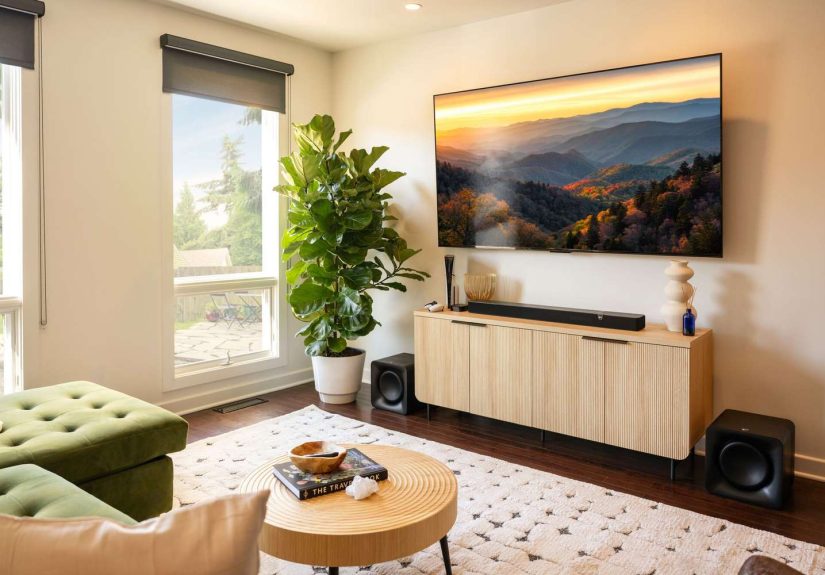
The Klipsch Flexus Sound System is a lineup of soundbars and add-ons that play nicely together.
The core idea is simple: buy what you need today, expand when you feel like it tomorrow.
Klipsch positions Flexus as “American sound + Japanese precision,” with Onkyo contributing the electronics platform and processing backbone.
The launch lineup centers around two “Core” soundbars and optional wireless speakers:
a Core 100 for smaller spaces and a step-up Core 200 for bigger rooms and bigger movie nights.
Add a Sub 100 if you want that low-end thump, and Surr 100 surrounds when you’re ready for true wraparound sound.
Why modular matters (besides saving your wallet’s feelings)
A lot of soundbar buyers fall into one of two camps:
(1) “I just want better dialogue,” or (2) “I want my couch to feel the T-Rex footsteps.”
Flexus aims to satisfy bothstarting simple, then scaling up with add-ons that connect wirelessly (you still plug them into power).
That means less clutter than traditional wired surround setups, and fewer “which cable is this?” moments.
Meet the Main Players: Core 100 vs. Core 200
Flexus Core 100: compact, punchy, and upgrade-friendly
The Flexus Core 100 is the smaller, entry-point soundbar in the system.
It’s positioned as a space-friendly optiongreat for bedrooms, apartments, and living rooms where a giant bar would look like it’s trying to become furniture.
It supports Dolby Atmos, though it achieves the “Atmos effect” through virtualization rather than dedicated up-firing drivers.
One standout talking point across retailer listings and reviews: it can deliver surprisingly strong bass for its size,
thanks to built-in low-frequency driversso you’re not forced to buy a subwoofer on day one just to feel like explosions have weight.
- Best for: small-to-medium rooms, first soundbar buyers, dialogue clarity upgrades.
- Atmos style: virtualized Dolby Atmos (not the “ceiling bounce” kind).
- Expansion: add Flexus wireless surrounds and subwoofer later.
Flexus Core 200: the “movie night deserves better” upgrade
The Flexus Core 200 is the bigger, more cinematic option.
It’s a 3.1.2-channel soundbar (translation: left/center/right + sub-bass handling + two height channels),
and it includes up-firing drivers for more convincing Dolby Atmos height effects.
Reviews frequently describe it as powerful and capable of filling larger rooms with easeespecially for action movies and games.
Core 200 is also designed to stand on its own, but it becomes a different animal when you add surrounds and a sub.
That’s the “build it as you go” promise of Flexus in actionstart with a strong foundation, expand into a full system when you’re ready.
- Best for: bigger rooms, Atmos fans, people who want a center channel for clearer dialogue.
- Atmos style: physical up-firing drivers for real height cues.
- Expansion: pair with Flexus Sub and Surrounds for a fuller theater experience.
What You Get: Features That Matter in Real Life
1) Easy connections (no treasure hunt behind the TV)
Flexus gear is built for modern TV setups. Expect HDMI eARC for one-cable simplicity,
plus common fallbacks like opticaland even USB-C appears in launch coverage.
HDMI eARC is the big one: it makes volume control smoother, reduces lip-sync headaches, and generally makes the soundbar feel “built-in.”
2) Wireless expansion that doesn’t feel like a science fair project
Klipsch’s pitch is that the surrounds and sub connect wirelessly to the soundbar, so the only mandatory cord for each add-on is power.
That’s a huge quality-of-life improvement versus running speaker wire under rugs like you’re hiding evidence.
3) App control that’s actually useful
The Klipsch Connect Plus app is the control hub for Flexus.
It’s where you’ll handle things like EQ adjustments, firmware updates, and features such as dialogue enhancement and night listening modes.
In other words, it’s the “make it work for your room” toolwithout forcing you to use a tiny on-soundbar button like it’s 2006.
4) A deliberate “keep it simple” approach (and the trade-offs)
Flexus is designed to be approachable and relatively affordable compared to flagship multi-box home theater systems.
But a few reviews also highlight what it’s not: you generally shouldn’t expect premium extras like built-in Wi-Fi streaming on every model
or automated room calibration on the entry bars.
That trade-off can be perfectly fineespecially if your priority is strong TV audio and a clean setup.
Just think of Flexus as “great sound, minimal drama,” not “every feature known to humankind, plus a space shuttle.”
Pricing and Availability: What “Now Available” Looks Like
Klipsch’s own messaging around Flexus is straightforward: the lineup is available to order through Klipsch and authorized dealers.
Pricing can vary by retailer (and by the seasonsoundbar discounts are basically a holiday tradition).
For example, some launch coverage listed the Core 100 at a higher MSRP, while major retailers have commonly shown pricing closer to the mid-$300 range,
with sales dropping below that. Core 200 is often positioned around the $500 neighborhood, also frequently discounted at big-box retailers.
The surrounds and subwoofer are priced as add-ons, letting you spread costs over time instead of buying everything upfront.
A practical way to budget the ecosystem
- Start: Core 100 for smaller rooms or Core 200 for bigger spaces and better Atmos.
- Next upgrade: Add Sub 100 if you want deeper impact for movies and games.
- Final boss move: Add Surr 100 surrounds for true rear sound placement.
This is the part where Flexus feels smart: you can stop at “good enough” or keep building until your living room starts sounding like an actual cinema.
Both are valid life choices.
How Flexus Fits Into the Current Soundbar World
The soundbar market is packed. Some brands lean heavily on software ecosystems and Wi-Fi streaming,
while others focus on raw sound output and simple setups. Flexus leans toward the second camp: strong performance, modular growth,
and a “no fuss” installation path.
Reviewers have generally praised Flexus for punchy dynamics and clear, room-filling soundespecially the Core 200’s cinematic impact.
At the same time, multiple evaluations note that certain high-end luxuries (like auto room calibration on the base models) aren’t the point here.
Klipsch seems to be betting that many people would rather have solid sound and an easy upgrade path than a feature list that reads like a spaceship manual.
Who should consider Flexus right now?
- Apartment and condo dwellers: Strong sound without a giant multi-speaker commitment on day one.
- Gamers: Big dynamics and clearer positioning make games feel more immersive.
- Dialogue strugglers: If you’re tired of riding the remote during every show, a real center channel (Core 200) helps.
- Upgrade planners: People who want a system that can grow without replacing everything.
Who might want to look elsewhere?
- Wi-Fi streaming super-fans: If you require AirPlay/Chromecast/Spotify Connect baked in, check features carefully.
- Auto-calibration perfectionists: If you want the bar to “measure your room and fix itself,” look at models focused on room correction.
Setup Tips: Get the Best Sound Without Overthinking It
Place the soundbar like it’s the “voice of the TV” (because it is)
Keep the bar centered under the screen, with a clear path to your listening position.
Avoid tucking it deep into a cabinet unless it’s designed for thatsoundbars want breathing room.
Use HDMI eARC if your TV supports it
HDMI eARC usually gives the most seamless results: easy control, better audio support, and fewer settings battles.
If you’re using optical, you’ll still get a boost over TV speakers, but you may lose some modern convenience.
When you add surrounds, focus on consistency, not perfection
The surrounds don’t have to be geometrically flawless. Aim for roughly ear-level placement behind or to the sides of your seating area.
The goal is believable immersion, not turning your living room into a math problem.
Dial in dialogue before you crank bass
Most people chase “big bass,” then realize they can’t understand what anyone’s saying.
Start with dialogue settings (and the app’s tuning options), then add low-end until it feels funnot messy.
Bottom Line: Why the Flexus Launch Matters
The Flexus Sound System feels like Klipsch aiming directly at a common modern reality:
people want better sound, but they don’t want a complicated, wire-heavy setupor a full home-theater purchase in one painful swipe.
Flexus offers a clean entry point with two cores, then optional upgrades that can turn “pretty good TV audio” into “oh wow, that helicopter is behind me.”
If you’ve been waiting for a modular soundbar ecosystem that’s more “plug in and enjoy” than “assemble your destiny,”
Flexus being available now is your sign.
Experiences: What It Feels Like Living With a Flexus Setup
Let’s talk about the part spec sheets don’t capture: the day-to-day “wow” momentsand the little quality-of-life wins that make a sound system feel worth it.
A modular soundbar setup like Flexus tends to change your routine in subtle ways. At first, it’s obvious: dialogue gets clearer, sound gets fuller,
and your TV stops sounding like it’s whispering from another dimension. But after a week, you notice something else:
you’re not constantly fiddling with the remote.
A common TV problem is volume whiplashquiet conversations followed by action scenes that sound like someone dropped a dumpster down a staircase.
With a better center-focused presentation (especially on a bar like the Core 200), the “spoken words” feel anchored to the screen instead of smeared across the room.
That means fewer emergency volume changes and fewer captions “just in case.”
And when you do want to go full blockbuster, the system has the headroom to make it exciting without immediately turning into harsh noise.
Movie night is where Flexus-style modularity shines. Start with the soundbar alone and you still get a major upgrade:
wider sound, stronger impact, and a sense that audio has shapenot just loudness. Then you add a subwoofer and suddenly the soundtrack has gravity.
Not “rattle the walls for no reason” gravity (unless you choose that path), but the kind where drums feel physical and explosions have depth.
It’s the difference between watching a thunderstorm and feeling it.
Adding wireless surrounds is the moment a lot of people go from “nice” to “I get it now.”
Surround sound is less about making everything louder and more about making sound more believable.
When a car passes behind the camera, you hear it move behind you. When a crowd scene happens, you feel like the room has expanded.
Even something as simple as rain in a scene can wrap around your space in a way that makes the picture feel more expensive.
And because the surrounds are designed to connect without running speaker wire across the room, the upgrade doesn’t have to become a weekend-long project.
It’s more “plug in, pair, and test with your favorite scene,” not “crawl under furniture and reconsider your life choices.”
Gaming is another underrated use case. Clearer positioning makes competitive play more readablefootsteps, reload cues, directional effects.
For story-driven games, the upgrade is even more dramatic: ambient sounds feel layered, dialogue is easier to follow, and big set pieces land the way developers intended.
You’ll likely find yourself replaying a familiar mission or rewatching a favorite episode just to hear what you were missing.
And then there’s the everyday stuff: YouTube, sports, late-night shows, random documentaries you clicked at 1:00 a.m.
This is where app control features and sound modes become practical instead of gimmicky.
A night mode that reins in the extremes can keep things neighbor-friendly. A dialogue boost can make a whispered plot twist audible without blasting everything else.
Simple EQ tweaks can help if your room is echoey, carpeted, or just acoustically weird (which is most rooms, honestly).
The best “Flexus experience” isn’t just that it sounds better.
It’s that it makes good audio easier to live with: fewer cables, a clear upgrade path, and a setup that grows with you.
You can start with “better TV sound today,” then gradually build toward “full-on home theater energy” without replacing the whole system.
That kind of flexibility feels… weirdly relaxing. Like your audio setup finally got on your schedule instead of the other way around.





 Close
Close