
Table of Contents >> Show >> Hide
- What Is Mending in Minecraft?
- How Mending Works
- Does Mending Use Your XP Levels?
- Can You Get Mending From an Enchanting Table?
- How to Find Mending in Minecraft
- How to Put Mending on an Item
- Best Items to Use Mending On
- Mending and Unbreaking: The Perfect Pair
- Mending vs. Infinity: Which Should You Choose?
- Why Your Mending Item Is Not Repairing
- Best XP Sources for Mending
- Practical Strategy: When to Get Mending
- Common Mending Mistakes
- Experience-Based Tips From Real Survival Gameplay
- Conclusion
If Minecraft gear had a retirement plan, Mending would be the premium package. This enchantment is the reason your favorite diamond pickaxe, Netherite sword, Elytra, fishing rod, or armor set can survive hundreds of mining trips, mob fights, End raids, and “I definitely meant to fall into that cave” moments. Instead of letting durability tick down until your item breaks, Mending uses experience points to repair the item automatically.
That sounds simple, but Mending has a few rules that confuse many players. You cannot pull it from a regular enchanting table. It works only when the item is held, worn, or equipped in the right slot. It also competes with other Mending items for XP, which is why your boots may get repaired while your poor pickaxe continues looking like it has survived three wars and a Creeper family reunion.
This complete guide explains what Mending does in Minecraft, how to use it correctly, where to find Mending books, which items deserve it first, and how to avoid the most common mistakes.
What Is Mending in Minecraft?
Mending is a treasure enchantment that repairs an item’s durability by using experience orbs. When you collect XP while holding or wearing a damaged item with Mending, the game redirects that XP into repairing the item instead of sending all of it to your experience bar.
In practical terms, Mending turns XP into durability. Every 1 point of experience can restore 2 durability points on an eligible damaged item. That makes it one of the most valuable enchantments in the game, especially for expensive gear like Netherite tools, Elytra, enchanted armor, and high-level weapons.
Why Mending Is So Valuable
Without Mending, every tool and armor piece eventually wears out. You can repair items with an anvil, but repair costs rise over time, and eventually the game may tell you the item is “Too Expensive.” Minecraft has no sympathy for emotional attachment to a pickaxe named “Rocky Balboa.” Mending solves this problem by letting you repair gear through normal gameplay: mining, fighting mobs, fishing, smelting, trading, and collecting XP from other sources.
With Mending and a steady XP source, a great item can last indefinitely as long as you do not let it break completely. That is why experienced players usually build their long-term gear around Mending.
How Mending Works
Mending does not repair every item in your inventory. It only works on eligible items that are currently equipped or held. This includes items in your main hand, offhand, and armor slots. If you have a damaged Mending pickaxe in your inventory but are not holding it, XP will not repair it.
Here is the basic process:
- You equip or hold an item that has Mending.
- The item must be damaged.
- You collect experience orbs.
- The XP repairs the damaged Mending item.
- If the item is fully repaired, leftover XP goes to your experience bar.
Example: Repairing a Mending Pickaxe
Imagine you have a diamond pickaxe with Efficiency V, Unbreaking III, Fortune III, and Mending. After a long mining trip, the pickaxe has lost 300 durability. If you hold that pickaxe and collect XP from mining ores, killing mobs, or taking smelted items from a furnace, the XP can repair the pickaxe. Since 1 XP point repairs 2 durability, you need about 150 XP points to restore 300 durability.
The repair happens automatically. You do not need to open an anvil, press a repair button, or whisper motivational quotes to the tool. Just hold the item and collect XP.
Does Mending Use Your XP Levels?
Mending uses experience orbs you collect, not levels already stored in your XP bar. This is an important difference. If you are level 35 and your pickaxe is damaged, Mending will not drain your level bar by itself. It only activates when new XP orbs are collected.
For example, if you are holding a damaged Mending shovel and then kill a zombie, the XP orbs from that zombie may repair the shovel. But if you stand still with 40 levels and do nothing, the shovel will not magically heal. Mending is powerful, not psychic.
Can You Get Mending From an Enchanting Table?
No. Mending cannot be obtained from a standard enchanting table in survival gameplay. It is a treasure enchantment, which means players must find it through special methods such as trading, loot chests, fishing, or certain edition-specific drops.
This is one of the biggest beginner mistakes. Many players build a full level-30 enchanting table setup, throw books into it, and wait for Mending to appear. It will not. You may get Sharpness, Protection, Efficiency, Fortune, or Unbreaking, but Mending is not part of the normal enchanting table pool.
How to Find Mending in Minecraft
There are several ways to get Mending, but they are not equally reliable. Some methods are practical. Some are lucky. Some feel like Minecraft is testing your patience, your snack supply, and your entire worldview.
1. Trading With Librarian Villagers
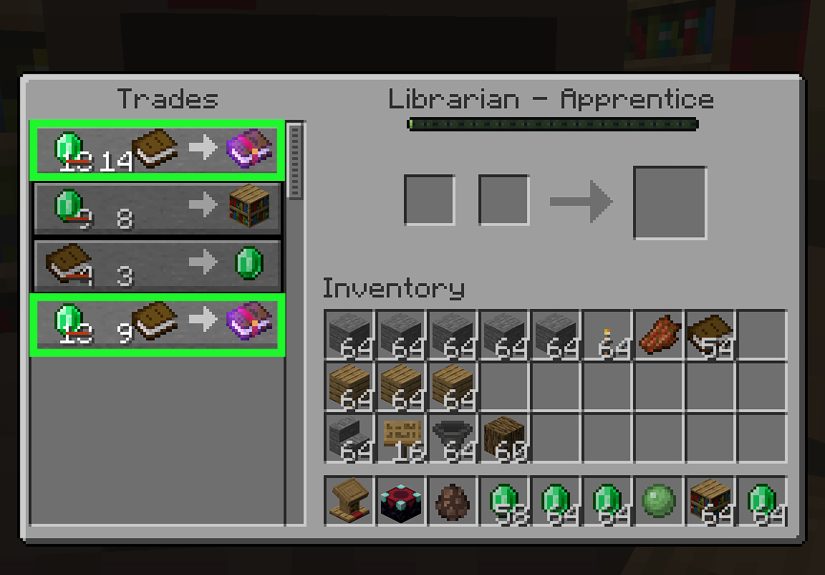
Trading with librarians is usually the most reliable way to get Mending in regular survival worlds. A librarian villager can sell enchanted books, and Mending can appear as one of those book trades. To create a librarian, place a lectern near an unemployed villager. If the villager has not been traded with yet, breaking and replacing the lectern can refresh the offered trades.
Once the librarian offers a Mending book, trade with that villager to lock the trade. After it is locked, the villager will keep that trade even if the lectern is moved or broken. This is why many players create a “Mending librarian” early in a survival world. It turns one rare enchantment into a renewable resource.
Important Note About Villager Trade Rebalance
Minecraft has tested experimental changes to villager trading. With the Villager Trade Rebalance experiment enabled, librarian trades can become biome-specific, and Mending may be tied to swamp librarians at higher profession levels. However, this is an experimental feature toggle, not the normal default rule in standard survival worlds unless that experiment is enabled.
So if your world uses normal trading, a librarian can still be the best route. If your world has experimental trade rebalance enabled, you may need to breed or move villagers in a swamp biome and level up the correct librarian type.
2. Looting Generated Structures
Mending books can appear in loot chests in certain generated structures. Good places to check include strongholds, ancient cities, jungle temples, dungeons, mineshafts, desert temples, and other treasure-heavy locations. This method is exciting because you may find Mending while exploring, but it is not guaranteed.
Ancient cities can be especially rewarding, but they also come with a small neighborhood problem known as the Warden. If you are hunting loot there, bring wool, sneak carefully, and do not treat shriekers like doorbells.
3. Fishing for Mending Books
Fishing can produce enchanted books, including Mending. The downside is that it can take a long time. A fishing rod with Luck of the Sea improves your odds of treasure catches, while Lure helps speed up bites. Even then, fishing for one specific enchantment is still a patience game.
Fishing is best if you enjoy relaxed gameplay or want to collect multiple enchanted books over time. It is not usually the fastest method if your goal is simply “get Mending today before my pickaxe turns into confetti.”
4. Raid Drops in Bedrock Edition
In Bedrock Edition, enchanted books can also come from raid-related drops. This makes raids another possible route, though not always the most convenient or beginner-friendly option. If you already run village raids for emeralds, totems, or challenge, Mending books may be a nice bonus.
How to Put Mending on an Item
Once you have a Mending enchanted book, you need an anvil to apply it. Place the item in the first anvil slot and the Mending book in the second slot. The output slot will show the enchanted item and the required XP level cost.
For example, to add Mending to a diamond pickaxe:
- Place the diamond pickaxe in the first anvil slot.
- Place the Mending book in the second slot.
- Pay the XP level cost.
- Take the repaired enchantment-ready pickaxe from the output slot.
It is often smart to plan enchantment order before combining many books. Anvils increase costs as items are combined, so careless enchanting can make future upgrades expensive. For high-end tools, combine books in pairs and avoid repeatedly adding one book at a time to the same item.
Best Items to Use Mending On
Mending can go on many items with durability, but some deserve it more than others. If you only have one Mending book, do not waste it on a wooden shovel unless you are doing a comedy speedrun.
1. Elytra
The Elytra is one of the best items for Mending because it is rare, valuable, and cannot be crafted. Flying around your world slowly damages it, and repairing it with phantom membranes is possible but annoying. With Mending, you can keep your Elytra alive by collecting XP.
2. Diamond or Netherite Pickaxe
Your main pickaxe is another top priority. A perfect mining pickaxe may include Efficiency V, Unbreaking III, Fortune III or Silk Touch, and Mending. Since pickaxes are used constantly, Mending saves huge amounts of diamonds, Netherite upgrades, and repair frustration.
3. Armor
Helmet, chestplate, leggings, and boots all benefit from Mending, especially if they have strong enchantments like Protection IV, Feather Falling IV, Respiration III, or Depth Strider III. Fully enchanted armor takes time to build, so preserving it is worth the investment.
4. Sword or Axe
A strong sword with Sharpness, Looting, Unbreaking, and Mending can last through countless mob farms, raids, and Nether trips. Axes also benefit, especially if you use one as both a tool and a weapon.
5. Fishing Rod
A fishing rod with Luck of the Sea, Lure, Unbreaking, and Mending can practically maintain itself. Since fishing provides XP, the rod often repairs while being used. It is one of the funniest examples of Minecraft letting a tool pay its own repair bill.
Mending and Unbreaking: The Perfect Pair
Mending is excellent by itself, but it becomes even better with Unbreaking. Unbreaking gives an item a chance not to lose durability when used, while Mending restores durability when you collect XP. Together, they make gear last much longer and repair less often.
Think of Unbreaking as reducing damage and Mending as healing damage. One prevents wear; the other fixes it. For serious survival worlds, most important gear should have both.
Mending vs. Infinity: Which Should You Choose?
Mending and Infinity are incompatible on bows in survival gameplay. That means you must choose one. Infinity lets you shoot unlimited regular arrows as long as you have one arrow in your inventory. Mending lets your bow repair itself with XP.
For many players, Infinity is more convenient for everyday combat because it saves inventory space and arrow crafting. However, a Mending bow can last forever if you keep feeding it XP. If you use tipped arrows or spectral arrows, Infinity does not cover those anyway, so Mending may be more attractive.
There is no single correct answer. Choose Infinity if you hate managing arrows. Choose Mending if you want your bow to survive long-term and do not mind carrying ammunition.
Why Your Mending Item Is Not Repairing
If Mending is not working, the problem is usually one of these simple issues:
- The item is not being held, worn, or placed in the offhand.
- The item is already fully repaired.
- Another damaged Mending item is receiving the XP instead.
- You are gaining XP levels from commands or other methods that do not create normal XP orb repair behavior.
- You are expecting stored XP levels to repair gear automatically, which Mending does not do.
How to Repair One Item Faster
If you want to repair one specific item quickly, remove or unequip other damaged Mending gear. For example, if your pickaxe needs repair, hold it in your main hand and temporarily take off damaged Mending armor. Then collect XP from a mob farm, furnace, sculk mining, trading, or ore mining. This gives the target item a better chance to receive the XP.
Best XP Sources for Mending
Mending is only as useful as your XP supply. Luckily, Minecraft offers plenty of XP sources once you know where to look.
Mob Farms
Mob farms are one of the most popular ways to repair Mending gear. Skeleton, zombie, guardian, Enderman, blaze, and general hostile mob farms can provide steady XP. An Enderman farm in the End is especially famous for quickly repairing tools and armor.
Mining Ores
Coal, redstone, lapis lazuli, diamond, emerald, quartz, and other XP-dropping ores can repair tools while you mine. Nether quartz is a classic early-to-midgame XP source because it is common and easy to mine.
Furnace and Smelting XP
Smelting items stores XP in furnaces, blast furnaces, and smokers. Taking cooked or smelted items out manually gives XP, which can repair Mending gear. This works well if you smelt large amounts of cactus, kelp, ores, food, or other materials.
Villager Trading
Trading with villagers gives XP and can repair held or worn Mending items. This pairs nicely with a trading hall because you can buy Mending books, earn XP, and repair gear in the same area.
Practical Strategy: When to Get Mending
In a new survival world, Mending becomes most important after you start building serious gear. Early iron tools are replaceable. But once you have diamond or Netherite equipment with strong enchantments, Mending should become a priority.
A strong progression path looks like this:
- Build a basic XP and resource setup.
- Get diamond tools and armor.
- Create a librarian trading setup or explore for loot.
- Secure at least one Mending book.
- Apply Mending to your best pickaxe or Elytra first.
- Add Mending to armor, weapons, and backup tools.
- Create a reliable XP source to maintain everything.
This approach keeps your best equipment from becoming disposable and makes long-term survival much smoother.
Common Mending Mistakes
Putting Mending on Low-Value Gear First
Mending is rare early on, so use your first book wisely. A Netherite pickaxe, Elytra, or fully enchanted armor piece is usually a better choice than a basic tool you could replace in two minutes.
Forgetting to Hold the Tool
Mending does not repair tools sitting quietly in your inventory. If you want to repair your pickaxe, hold it. If you want to repair your Elytra, wear it. Minecraft gear does not heal through emotional support alone.
Wearing Too Much Damaged Mending Gear
If several damaged Mending items are equipped, XP can be divided randomly among them. This is normal, but it can make one item repair slowly. When you need to fix something urgently, isolate it.
Letting Items Break
Mending cannot repair an item after it breaks. If your Elytra or pickaxe is almost dead, stop using it and repair it immediately. “Just one more block” is how many legendary tools become sad memories.
Experience-Based Tips From Real Survival Gameplay
Mending changes the way you play Minecraft because it makes your best gear feel permanent. In a typical survival world, the first Mending book often feels like a major milestone. Before Mending, every mining trip carries a little pressure. You watch your diamond pickaxe lose durability and wonder whether the next cave adventure will be its last. After Mending, that same pickaxe becomes a long-term companion, especially when paired with Unbreaking III.
One practical experience is that the first Mending item should usually be your main pickaxe. A great pickaxe supports almost every other goal: mining diamonds, gathering stone, collecting ores, building farms, digging tunnels, and shaping bases. If you put Mending on a Fortune III pickaxe, it helps you gather more diamonds, coal, redstone, lapis, and emeralds. If you put it on a Silk Touch pickaxe, it becomes perfect for collecting stone, glass, ores, bookshelves, and delicate blocks. Either choice is strong, but many players eventually keep both: one Fortune pickaxe and one Silk Touch pickaxe, each with Mending and Unbreaking.
Another lesson is that Mending works best when you build habits around XP. For example, when returning from mining, hold the damaged tool while collecting furnace XP. When trading with villagers, hold the item that needs repair. When using a mob farm, remove extra damaged Mending armor if you want to repair one specific tool faster. These small habits save time and prevent the classic problem of wondering why your pickaxe is still damaged after you collected five minutes of XP.
Elytra repair is another place where Mending feels almost required. Once you start flying with rockets, it is easy to forget that your wings are slowly losing durability. A Mending Elytra can be repaired with XP, but only if you pay attention before it gets too low. A smart routine is to check Elytra durability before long flights, especially before traveling over the void, lava oceans, or unexplored terrain. Nobody wants their wings to give up midair like they suddenly remembered they had other plans.
Villager trading also teaches patience. Resetting librarian trades can be boring, but once you lock in a Mending trade, the whole world opens up. Suddenly, every future tool and armor piece can become renewable. It is worth protecting that librarian with good lighting, walls, and maybe even a name tag. Treat your Mending villager like royalty, because in survival economics, that villager is basically the CEO of “Your Gear Will Not Die, Inc.”
Finally, Mending is powerful, but it should not make you careless. Lava, the void, explosions, and accidental item drops can still destroy or lose gear. Mending protects durability, not your decision-making. Keep backup tools, store extra Mending books, and avoid carrying every valuable item into risky areas. The best Minecraft players use Mending not as an excuse to be reckless, but as a way to spend less time replacing gear and more time building, exploring, and doing wonderfully unnecessary projects like a castle for one chicken.
Conclusion
Mending is one of the best enchantments in Minecraft because it turns experience into durability repair. It keeps valuable tools, armor, weapons, Elytra, and fishing rods alive far longer than normal repairs. Since it is a treasure enchantment, you cannot get it from a regular enchanting table. Instead, look for Mending through librarian trades, loot chests, fishing, and certain Bedrock Edition raid drops.
To use Mending properly, remember the golden rule: hold it, wear it, or equip it before collecting XP. Pair it with Unbreaking, build a reliable XP source, and prioritize your most valuable gear first. Do that, and your favorite Minecraft items can survive so long they start feeling like part of the familyslightly pixelated, extremely useful family.
Note: This article is written as publish-ready body HTML and is based on current Minecraft mechanics, including standard survival behavior and the experimental villager trade rebalance distinction.





 Close
Close