
Table of Contents >> Show >> Hide
- What Is a Hands-Free Haptic Braille Display?
- How HaptiRead Works
- Why This Technology Matters
- Hands-Free Does Not Mean Effort-Free
- Where It Could Be Used
- How It Compares With Traditional Refreshable Braille Displays
- The Role of Smartphones and Modern Accessibility Tools
- Benefits of Hands-Free Haptic Braille Displays
- Challenges Still Ahead
- Why Designers Should Pay Attention
- Experience Notes: What Hands-Free Haptic Braille Could Feel Like in Real Life
- Conclusion: A Small Touch From the Future
Imagine walking up to a kiosk, holding your hand in the air, and feeling braille characters appear on your fingertips without touching a single surface. No buttons. No glass screen. No “please wipe this before using” moment. That is the promise behind the hands-free haptic braille display, an emerging assistive technology idea that sounds a little like science fiction but is very much rooted in real research.
At the center of the buzz is HaptiRead, a mid-air haptic braille system developed by researchers at the University of Bayreuth. Instead of using the traditional tiny moving pins found in a refreshable braille display, HaptiRead uses focused ultrasound to create tactile sensations in the air. In simpler terms: it lets users feel braille-like dots without placing their fingers on a physical device. Yes, the future just tapped us on the hand.
The technology is not here to replace every braille display tomorrow morning before breakfast. It is still experimental, and there are practical questions to solve. But it is making waves because it points toward a future where public information, digital signs, ticket machines, ATMs, transit displays, and interactive maps could become more accessible without requiring a dedicated device in every user’s bag.
What Is a Hands-Free Haptic Braille Display?
A hands-free haptic braille display is a tactile interface that delivers braille information through touch feedback without requiring users to press their fingers onto a physical braille cell. Traditional refreshable braille displays rely on small mechanical pins that rise and fall to form braille characters. Users read the line by moving their fingers across the cells, much like reading embossed braille on paper.
A mid-air haptic display takes a different route. It projects touch sensations onto the hand using ultrasonic waves. These waves are controlled so they meet at specific points in space, creating tiny pressure sensations on the skin. When arranged in patterns, those sensations can represent braille dots, shapes, icons, or even simple 3D information.
Think of it as braille’s airborne cousin: still tactile, still meaningful, but no physical surface required. It is less like reading a book and more like feeling invisible dots gently tap your hand in a controlled pattern.
How HaptiRead Works
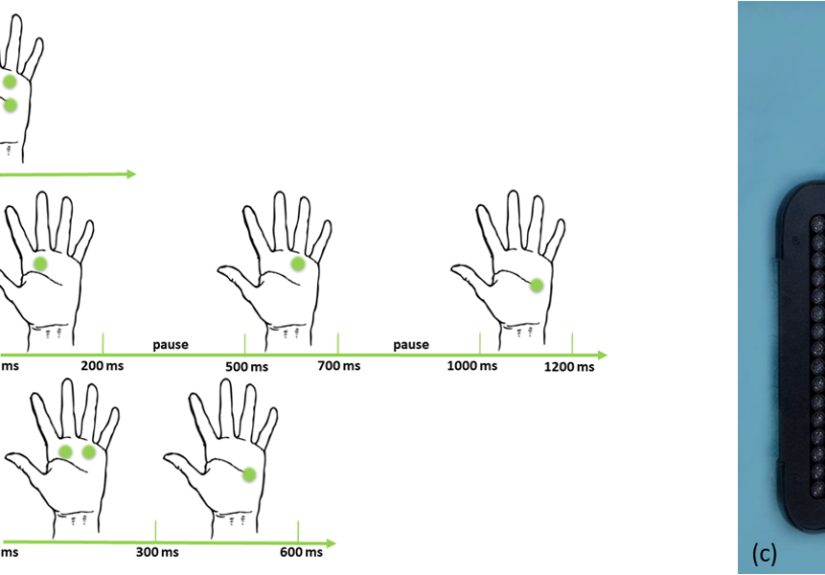
HaptiRead uses mid-air haptics to present braille characters through ultrasonic feedback. The system is based on an array of ultrasonic transducers, which are tiny sound emitters arranged in a grid. These transducers produce sound waves above the range of human hearing. When the system focuses those waves at a point above the device, the user feels a small touch sensation on the skin.
In the HaptiRead research, braille dots were presented using different stimulation methods. One method delivered dots all at once. Another presented dots point by point. A third delivered them row by row. The point-by-point method performed especially well in early testing, which suggests that timing matters as much as the dots themselves. Braille is not just a pattern; it is a reading experience, and the brain needs a clean rhythm to decode it.
This is one reason the research is exciting. It does not simply ask, “Can we make invisible dots?” It asks, “Can people understand those invisible dots accurately enough for real communication?” That is the difference between a cool demo and a useful accessibility tool.
Why This Technology Matters
Braille remains one of the most powerful tools for literacy, independence, and private reading among blind and low-vision users who read braille. Audio tools are incredibly useful, but they do not replace every benefit of tactile reading. Braille supports spelling, punctuation, formatting, math, coding, editing, and quiet access to information. It lets users read without broadcasting their emails, passwords, bank prompts, or text messages to everyone within earshot.
Refreshable braille displays already do an amazing job of connecting braille readers with computers, smartphones, tablets, and digital documents. Many models can pair with screen readers and mobile devices, giving users tactile access to everything from emails to spreadsheets. The challenge is that these devices can be expensive, specialized, and sometimes limited by size. Many single-line displays show a small amount of text at a time, while larger multiline tactile displays are impressive but can be costly and less portable.
A hands-free haptic braille display could add another option. It may be especially useful in public spaces, shared devices, and situations where touchless interaction is valuable. For example, a transit station could provide departure information through a mid-air tactile interface. A museum exhibit could offer tactile labels without requiring every visitor to handle the same surface. A hospital kiosk could display private prompts without spoken audio. Suddenly, accessibility becomes part of the environment instead of an optional add-on hidden in a settings menu.
Hands-Free Does Not Mean Effort-Free
Let’s be clear: hands-free haptic braille is promising, but it is not magic dust sprinkled over every accessibility problem. Users still need to locate the interactive area, hold their hand in a readable position, interpret the haptic patterns, and receive information at a speed that feels practical. If the system is slow, awkward, or inconsistent, the novelty wears off faster than a phone battery at 2 percent.
There is also a learning curve. Traditional braille readers are used to physical dot patterns under the fingertips. Mid-air braille introduces a different sensation. Instead of sliding across raised dots, users may feel pulses or pressure points on the palm or fingers. That means researchers and designers must carefully study comfort, speed, accuracy, fatigue, and user preference.
The best accessibility technology is not just technically clever. It is dependable, affordable, understandable, and designed with users from the beginning. A hands-free haptic braille display will only succeed if blind and low-vision users are central to testing, feedback, and design decisions.
Where It Could Be Used
Public Transit
Transit systems are full of visual information: platform numbers, arrival times, delays, route changes, and emergency notices. A touchless braille interface could allow users to access key details without needing to find a staff member or rely only on audio announcements. Picture a bus stop where a user places a hand near a marked haptic zone and feels the next route number or countdown time.
ATMs and Payment Kiosks
Privacy is a big deal in financial transactions. Audio output can be helpful, but it may not be ideal when sensitive information is involved. A tactile, hands-free display could provide prompts, menu choices, or confirmation messages in a quieter, more private format. That said, security and reliability would need to be extremely strong before this kind of use became common.
Museums and Education
Mid-air haptics can do more than present text. Because the same technology can produce shapes and spatial patterns, it could support tactile diagrams, exhibit labels, and educational models. Students could feel simple graphs, geometry cues, or interactive labels without requiring a separate embossed handout for every display.
Healthcare and Shared Screens
Touchless technology became especially interesting in public health contexts because shared surfaces can be inconvenient or unsanitary. A haptic braille interface could help make check-in kiosks, pharmacy stations, or hospital wayfinding systems more accessible while reducing the need to touch public screens.
How It Compares With Traditional Refreshable Braille Displays
Traditional refreshable braille displays remain the gold standard for many serious braille readers. They provide physical dots, predictable spacing, established compatibility, and a familiar reading method. A student writing code, a professional editing a document, or a deafblind user reading long text may still prefer a physical braille display because it is precise and stable.
Hands-free haptic braille is better understood as a complementary technology. It could shine in quick-information moments: reading a room number, identifying a menu option, checking an alert, or feeling a short label. It may not be the best tool for reading a novel, reviewing a legal contract, or editing a 3,000-row spreadsheet. Nobody wants to read “Terms and Conditions” one floating haptic dot at a time unless they have truly offended the technology gods.
In the long run, the accessibility ecosystem may include both approaches. Physical braille displays could continue serving deep reading and writing tasks, while mid-air haptic systems support public access, quick navigation, and shared digital interfaces.
The Role of Smartphones and Modern Accessibility Tools
The rise of mobile accessibility makes this technology even more interesting. iPhone and Android devices already support braille input, braille displays, screen readers, and accessibility gestures. Apple’s Braille Access, for example, turns supported Apple devices into a braille note-taking experience when paired with a connected braille display. Android’s TalkBack includes braille keyboard support and can connect to compatible braille displays.
This matters because future hands-free haptic braille systems may not live alone. They could connect with smartphones, apps, wearables, transit platforms, smart home systems, or augmented reality tools. A user might receive a navigation cue through a haptic interface, confirm it with audio, and then read a short braille prompt on a physical display. Accessibility works best when users can choose the channel that fits the moment.
Benefits of Hands-Free Haptic Braille Displays
The first major benefit is contactless interaction. In public environments, a touchless display can reduce the need to handle shared surfaces. It can also make digital signage more inclusive without adding large mechanical components that require constant maintenance.
The second benefit is flexibility. Because ultrasound-based haptics can create different tactile patterns in space, the same system could potentially display braille, arrows, shapes, icons, buttons, and simple diagrams. That versatility is valuable for environments where information changes frequently.
The third benefit is discoverability. A well-designed system could use audio beacons, tactile floor markings, or smartphone guidance to help users find the haptic zone. Once there, the user could receive information without needing to connect personal hardware.
The fourth benefit is privacy. Compared with spoken output, tactile output can be quieter and more discreet. That matters in banks, hospitals, classrooms, offices, and other places where users may not want their information announced like a game show prize.
Challenges Still Ahead
Accuracy is one challenge. Braille depends on precise dot recognition, and haptic sensations in mid-air can vary based on hand position, skin sensitivity, environment, and timing. A system that works well in a lab must also work in a busy train station, under bright lights, beside impatient commuters, and possibly next to someone eating fries with heroic enthusiasm.
Speed is another challenge. Braille readers can become highly efficient with physical braille. If mid-air haptic braille is too slow, it may be useful only for short messages. Designers must balance readability with speed so that the experience feels helpful rather than tedious.
Cost and deployment are also important. Public technology must be durable, maintainable, and worth installing at scale. Cities, schools, museums, and companies will need clear reasons to invest. The best argument will not be “this is futuristic.” It will be “this helps real people access real information more independently.”
Why Designers Should Pay Attention
Hands-free haptic braille is part of a larger shift in human-computer interaction. For decades, digital design focused heavily on screens. Then voice assistants grew popular. Now, touch and haptics are becoming more sophisticated. The future of accessibility will likely be multimodal, combining audio, tactile feedback, visual contrast, voice control, gesture input, and braille support.
For designers, the lesson is simple: accessibility should not be added at the end like a forgotten garnish. It should shape the product from the beginning. If a kiosk, app, or public interface depends only on vision, it excludes people. If it depends only on audio, it may fail in noisy or private situations. Haptic braille gives designers another way to communicate information through touch.
Experience Notes: What Hands-Free Haptic Braille Could Feel Like in Real Life
Because this technology is still emerging, the most useful way to understand it is through realistic experience scenarios. Imagine a blind commuter entering a train station during rush hour. The loudspeaker is announcing something, but the sound bounces around the platform like a ping-pong ball in a gymnasium. The commuter finds a marked accessibility point near the ticket machine. A phone app or audio cue says, “Place your hand above the haptic area.” A moment later, the user feels a short pattern indicating the platform number, followed by a route abbreviation. It is not a full conversation; it is just the right information at the right time.
Now picture a student at a science museum. A display about planets includes a mid-air tactile station. The student can feel simple circular shapes representing orbit paths, then switch to short braille labels for planet names. Instead of being told, “Just listen to the description,” the student gets a tactile experience that matches the subject. Space becomes something to feel, not just something described from a distance.
In an office setting, a hands-free haptic braille display could help with room booking panels or shared conference equipment. A braille reader might approach a meeting room screen and receive a short tactile prompt: “Room occupied until 2:30.” That kind of quick access reduces dependence on coworkers and makes the workplace feel less like a maze built by people who forgot not everyone reads wall screens.
Another experience could happen in healthcare. A patient checking in at a clinic might use headphones for screen reader output, but some information is better kept private. A haptic braille prompt could confirm a selection or appointment time without speaking it aloud. This would not replace staff support, but it could make routine steps more independent and less awkward.
The emotional experience matters too. Accessibility is not only about completing a task. It is about dignity, speed, privacy, and feeling included without having to request a workaround every five minutes. A hands-free haptic braille display could make public technology feel more welcoming when it is designed well. Instead of asking users to adapt to inaccessible systems, the environment adapts to them.
Of course, the experience must be comfortable. Holding a hand in the air for too long can become tiring. The tactile patterns must be strong enough to feel but not so intense that they become distracting. The system must give users time to repeat a message, slow down output, change modes, or switch to audio. Real accessibility means control belongs to the user.
The best version of this technology would feel calm, predictable, and optional. Users could choose haptic braille when it helps, audio when it is faster, and a physical braille display when deep reading is needed. That is the future worth building: not one shiny gadget that claims to solve everything, but a thoughtful toolkit that gives people more ways to read, move, learn, and participate.
Conclusion: A Small Touch From the Future
The hands-free haptic braille display is making waves because it expands how we imagine accessible information. HaptiRead and similar mid-air haptic research show that braille does not always need a physical surface to be meaningful. With focused ultrasound, tactile information can appear in open space, offering a new path for public interfaces, education, transportation, healthcare, and shared digital systems.
The technology is not ready to replace traditional refreshable braille displays, and it should not be treated as a one-size-fits-all miracle. Physical braille displays remain essential for many users, especially for long-form reading, writing, coding, math, and detailed editing. But touchless haptic braille could become a powerful companion technology, especially in places where short, private, and contactless information matters.
The real wave is not just the device. It is the idea that accessibility can be built into the air around us. And when technology starts meeting users where they are, that is more than innovation. That is progress you can actually feel.



 Close
Close