
Table of Contents >> Show >> Hide
- What Does “Hidden Instructions” Actually Mean?
- Start With the Official Map: CPUID
- Why Your Operating System May Not Show Everything
- Documented Instructions vs. Undocumented Instructions
- How Researchers Search for Hidden CPU Instructions
- Why CPU Instruction Decoding Is So Hard
- Microcode: The CPU’s Behind-the-Scenes Translator
- Practical Ways to Discover Your CPU’s Official Instruction Support
- What Not to Do When Looking for Hidden Instructions
- Why Hidden CPU Instructions Matter for Security
- Why Hidden CPU Instructions Matter for Performance
- Hidden Does Not Always Mean Secret
- How to Think Like a CPU Detective
- Experience Notes: What It Feels Like to Find Instructions Hidden In Your CPU
- Conclusion: Your CPU Has More Stories Than Its Sticker Says
Your processor is not just a tiny silicon accountant adding numbers at inhuman speed. It is a layered city of documented features, special registers, instruction extensions, microcode routines, compatibility quirks, and occasionally, mysterious byte sequences that behave like secret doors in an old video game. Finding instructions hidden in your CPU is part computer science, part detective work, and part “please do not run this on your only laptop before lunch.”
For most people, the phrase sounds dramatic, as if a processor is whispering forbidden spells under the motherboard. In reality, the topic has two sides. The first is completely ordinary: discovering which instruction sets your CPU officially supports, such as SSE, AVX, AES-NI, SHA extensions, virtualization features, or security mitigations. The second side is research-grade and much weirder: investigating undocumented instructions, decoder anomalies, and processor behaviors that are not clearly described in public manuals.
What Does “Hidden Instructions” Actually Mean?
A CPU instruction is a command encoded as machine code. Software developers usually meet instructions through assembly language mnemonics like MOV, ADD, CPUID, or AESENC. Compilers generate these instructions automatically, which is why most programmers can build entire careers without hand-writing assembly. That is probably healthy for their blood pressure.
When people talk about hidden CPU instructions, they may mean one of three things. First, they may mean documented but undiscovered-by-the-user instructions. Your machine might support AVX2, BMI2, AES, FMA, or virtualization instructions, but your software may not be checking for them. Second, they may mean model-specific or privileged functionality, such as instructions and registers meant for operating systems, firmware, hypervisors, or microcode-level behavior. Third, they may mean undocumented instructions: byte patterns that the public instruction manual does not describe, but the processor still executes in some observable way.
The key distinction is important. Finding official CPU features is normal system programming. Hunting undocumented instructions is advanced reverse engineering. One is like reading the labels in your fuse box. The other is like tapping on the basement wall and discovering a tunnel that may or may not lead to treasure, danger, or a raccoon with tenure.
Start With the Official Map: CPUID
The safest and most useful way to find instructions in your CPU is to ask the processor directly through CPUID. On x86 and x86-64 systems, CPUID is an instruction that returns processor identification and feature information. Software calls it with a specific “leaf” and sometimes a “subleaf,” then reads the results from registers. Those register bits tell software whether the CPU supports particular capabilities.
That sounds dry, but it is incredibly practical. A video editor may use CPUID to decide whether it can use AVX2 or AVX-512 paths. A cryptography library may check for AES-NI to speed up encryption. A database engine may inspect CPU capabilities before choosing a vectorized query path. A game engine may select optimized math routines based on available SIMD instructions. Without feature detection, software would be forced to guessand guessing at the CPU level is how programs become confetti.
Common CPU Features You Can Discover
When you inspect a modern CPU, you may see feature names such as SSE4.2, AVX, AVX2, FMA, BMI1, BMI2, AES, SHA, FSGSBASE, RDRAND, RDSEED, VMX, SVM, SMEP, SMAP, and CET. Some improve performance. Some support virtualization. Some help security. Some are only useful if the operating system has enabled the necessary state.
This last detail matters. A processor may expose a capability, but software still needs operating system support to use it safely. For example, wide vector instructions require the OS to save and restore the larger register state during context switches. That is why serious software does not simply check one bit and sprint into the sunset. It checks the CPU, the operating system, the compiler, and sometimes the exact microarchitecture.
Why Your Operating System May Not Show Everything
On Linux, many users first look at /proc/cpuinfo. It is convenient, readable, and full of mysterious flags that make your processor look like it is applying for a cybersecurity job. However, /proc/cpuinfo generally shows features that the kernel knows about and has enabled, not necessarily every CPUID bit the physical CPU can report. For deeper inspection, kernel-oriented tools such as kcpuid are more appropriate.
On Windows, developers commonly use compiler intrinsics such as __cpuid and __cpuidex. On GCC, programmers may use __builtin_cpu_supports for runtime feature checks. Clang also provides CPUID helpers through its headers. These tools are not glamorous, but they are the responsible adult in the room. They let software ask, “Can I use this instruction?” before using it and face-planting on older hardware.
In real-world software, the best practice is to provide a safe fallback path. If AVX2 is present, use the fast version. If it is not, use SSE or scalar code. That way the application runs on more machines, performs better where possible, and does not punish users for owning a perfectly decent computer that happens to be a few generations old.
Documented Instructions vs. Undocumented Instructions
Official instruction set manuals from CPU vendors are enormous for a reason. Modern x86 is a museum, a skyscraper, and a storage closet all bolted together. It must support decades of software while adding new extensions for media processing, encryption, virtualization, AI acceleration, security isolation, and performance monitoring.
A documented instruction is one the vendor describes publicly: its opcode, operands, flags, exceptions, modes, and behavior. An undocumented instruction is different. It may be a leftover from validation, a duplicate encoding, an internal diagnostic path, a vendor-private function, a decoder artifact, or behavior that exists because the silicon cannot simply pretend certain byte patterns do not exist.
Undocumented does not automatically mean malicious. It also does not automatically mean useful. Many strange instruction encodings are boring. Some behave like aliases of existing instructions. Some cause exceptions. Some vary by processor generation. Some confuse disassemblers, emulators, or hypervisors. The danger is not only that a mysterious instruction exists; it is that tools may disagree about what that byte sequence means.
How Researchers Search for Hidden CPU Instructions
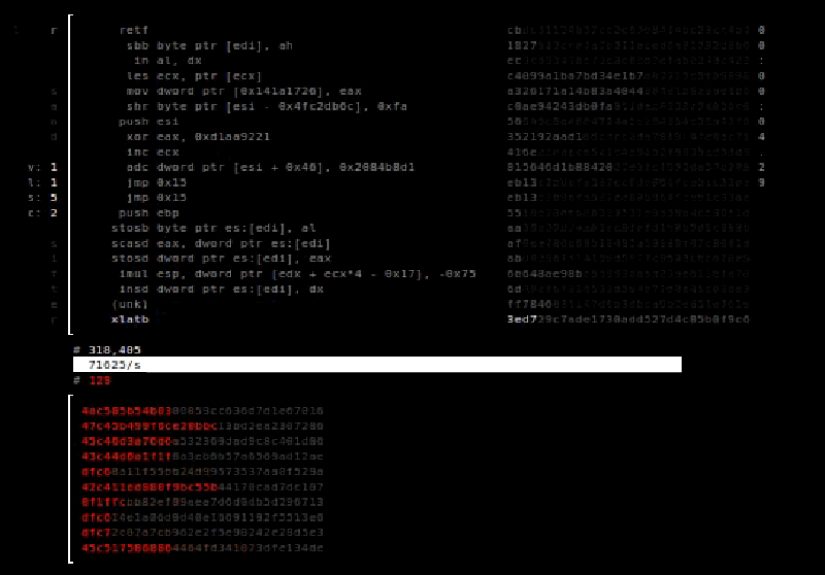
Security researchers have explored hidden x86 behavior through a technique called fuzzing. In simple terms, fuzzing means generating many inputs and watching for unusual results. For CPU instruction research, the input is machine code. A tool generates byte sequences, executes them under controlled conditions, and records whether the processor accepts them, rejects them, traps, behaves inconsistently, or does something that the disassembler did not predict.
One famous project in this area is Sandsifter, an x86 processor fuzzer associated with research on undocumented instructions and hardware bugs. The idea is not to randomly smash the keyboard and hope a dragon appears. It is to systematically reduce the enormous opcode search space, run carefully constructed tests, compare processor behavior against a disassembler, and sift for anomalies.
The Three Kinds of Surprises
Researchers often classify the surprises into broad buckets. The first bucket is undocumented instructions, where the processor executes a byte sequence that the reference tool does not recognize. The second is software tooling bugs, where a disassembler, assembler, emulator, or hypervisor interprets instruction length or behavior incorrectly. The third is hardware bugs, where the processor itself behaves unexpectedly or inconsistently.
This is why hidden-instruction research matters beyond curiosity. If a hypervisor misunderstands an instruction, a virtual machine boundary may behave incorrectly. If a disassembler misreads instruction length, a reverse engineer may analyze the wrong code. If an emulator and physical CPU disagree, malware analysis, compatibility testing, or security tooling may draw the wrong conclusion.
Why CPU Instruction Decoding Is So Hard
Instruction decoding on x86 is famously complicated. Unlike fixed-width instruction sets, x86 instructions have variable lengths. Prefix bytes can modify behavior. Addressing modes can change encoding. Extensions add new maps. Legacy compatibility keeps old behavior alive. A byte sequence may be valid in one mode and invalid in another. The CPU decoder has to make sense of all of this at high speed, billions of times per second, without looking emotionally exhausted.
This complexity creates room for disagreement. A disassembler may say one thing. An emulator may say another. A real CPU may do a third thing. A hypervisor may trap and emulate certain instructions but accidentally miss a detail. Modern tooling has improved tremendously, but the instruction decoder remains a place where tiny assumptions can create large consequences.
That is also why differential fuzzing is useful. Instead of trusting one tool as perfect, researchers compare multiple decoders and execution environments. If Tool A says an instruction is five bytes, Tool B says it is seven bytes, and the physical CPU behaves like it is six bytes wearing a fake mustache, that mismatch deserves attention.
Microcode: The CPU’s Behind-the-Scenes Translator
Many complex CPU instructions are not executed as one simple hardware action. They may be translated into smaller internal operations called micro-operations, and some complex behavior may involve microcode. Microcode is a low-level control layer inside the processor. It helps implement complicated instructions, errata fixes, and certain architectural behaviors.
This does not mean users can casually edit their CPU like a spreadsheet. Production microcode update mechanisms are controlled, signed, and vendor-specific. But microcode matters because it shows that the instruction set you see from software is not always the same as the internal machinery that performs the work. The public instruction may be the restaurant menu; the microarchitecture is the kitchen, the staff, the storage room, and the chef yelling about timing.
Researchers studying microcode and undocumented behavior are usually operating in highly controlled environments, often with specific older chips, lab systems, or carefully isolated machines. For ordinary users and developers, the lesson is simpler: the CPU is more layered than it looks, and the safest path is to rely on documented features, vendor guidance, operating system support, and mature compiler tools.
Practical Ways to Discover Your CPU’s Official Instruction Support
You do not need a laboratory to learn useful things about your CPU. The practical route begins with ordinary feature discovery. On Linux, inspect CPU flags and use reliable system tools. On Windows, use vendor utilities, system information tools, or development intrinsics. On macOS, system profiler tools can reveal processor details, though Apple Silicon uses a different architecture and feature model than x86 PCs.
For developers, the right approach depends on language and compiler. C and C++ programs on Windows can use __cpuid or __cpuidex. GCC provides CPU detection built-ins for runtime checks. Libraries in Rust, Go, Java, .NET, and other ecosystems often wrap CPU feature detection so developers do not need to manually decode register bits. This is usually better than rolling your own parser unless you truly know what you are doing.
A Simple Real-World Example
Imagine a compression program. On a modern CPU with AVX2, it can process more data per instruction. On an older CPU, the same AVX2 instruction would be invalid. A well-designed program checks CPU support at startup, selects the fastest compatible implementation, and quietly does the right thing. The user never sees the decision. They just notice that the program is fast and does not explode. That is the gold standard of CPU feature detection: powerful, invisible, and not dramatic.
What Not to Do When Looking for Hidden Instructions
Do not run random opcode fuzzers on your daily computer. Do not test unknown privileged instructions on a machine containing important data. Do not assume virtualization will protect you from every weird hardware behavior. Do not publish sensational claims without checking whether the instruction is already documented in a newer manual, vendor extension, or obscure appendix. The CPU world is full of “secret discoveries” that turn out to be footnotes wearing sunglasses.
If you are doing research, use an isolated machine, save your data, understand the risk of crashes, and avoid running experiments on systems you do not own or administer. Even benign fuzzing can freeze a machine, trigger kernel problems, confuse hypervisors, or produce misleading results. Serious CPU research is not a party trick; it is careful measurement.
Also remember that undocumented behavior may not be stable. A byte sequence that behaves one way on one processor stepping may fail on another. Microcode updates may change behavior. Virtual machines may hide, emulate, or distort results. Cloud servers may not expose the real hardware directly. If your experiment depends on a mysterious instruction staying mysterious in a very specific way, congratulations: you have built a house on pudding.
Why Hidden CPU Instructions Matter for Security
Hidden or poorly understood CPU behavior matters because security depends on clear boundaries. Operating systems, compilers, debuggers, hypervisors, sandboxes, and forensic tools all need to understand what code can do. If the hardware accepts instructions that tools do not recognize, there is room for blind spots.
For example, a disassembler used in malware analysis might incorrectly decode an instruction stream. That can hide control flow, confuse automated analysis, or cause a human analyst to inspect the wrong operation. A hypervisor might emulate a sensitive instruction imperfectly, creating a gap between what guest software expects and what the host actually enforces. A debugger might step through code incorrectly if instruction length is misread.
At the same time, the existence of undocumented behavior does not mean every CPU is secretly compromised. Modern processors are developed, validated, patched, and documented through enormous engineering efforts. The realistic view is balanced: CPUs are powerful and complex, complexity creates edge cases, and edge cases deserve research rather than panic.
Why Hidden CPU Instructions Matter for Performance
Most developers will never use undocumented instructions, but they absolutely benefit from discovering documented instruction support. Performance-critical software often ships multiple code paths. A media encoder might have scalar, SSE, AVX2, and AVX-512 versions. A cryptographic library may use AES-NI where available. A machine learning runtime may choose specialized vector instructions. A game engine may select optimized math routines based on CPU capabilities.
The performance difference can be huge. A program that understands your CPU can use wider registers, specialized operations, and better memory instructions. A program that ignores CPU features may still work, but it leaves horsepower in the garage. That is like buying a sports car and using it only to store gardening gloves.
However, optimization must be careful. Newer is not always faster in every situation. Some wide-vector instructions can affect clock speed or power behavior. Some instruction paths help only with large data. Some are bottlenecked by memory rather than computation. Smart software measures performance, checks features correctly, and chooses based on real workloads.
Hidden Does Not Always Mean Secret
One of the funniest parts of CPU exploration is that “hidden” often means “hidden from the person looking,” not hidden from the world. Many features are documented but buried in manuals that are thousands of pages long. Others are known to compiler writers but unfamiliar to application developers. Some appear under cryptic flag names that make sense only after reading architecture documentation and possibly drinking strong coffee.
For example, a user may discover that their CPU supports AES acceleration and feel as though they found a secret. In reality, the feature may be public, documented, and used by many libraries. The discovery is still valuable. Understanding your CPU’s features helps you explain performance differences, choose software builds, troubleshoot compatibility issues, and make better hardware decisions.
True undocumented instructions are rarer, harder to verify, and less useful to everyday users. They belong mostly to researchers, hardware security specialists, emulator developers, compiler engineers, and people who think weekend fun includes staring at opcode maps. We respect them. We also hope they hydrate.
How to Think Like a CPU Detective
If you want to explore your CPU responsibly, start with questions, not tools. What processor do you have? Which architecture is it: x86-64, ARM64, or something else? Which instruction sets are officially supported? Does your operating system enable them? Does your compiler know how to target them? Does your application actually use them?
Then compare layers. The vendor manual tells you what may exist. CPUID tells you what the processor reports. The operating system tells you what is enabled. The compiler tells you what code it can generate. Benchmarks tell you whether the feature helps your workload. This layered thinking prevents the classic mistake of seeing one feature flag and assuming everything above it magically works.
For undocumented research, the detective mindset becomes stricter. You need reproducibility, isolation, controlled execution, multiple tools, and skepticism. A crash is not automatically a discovery. A disassembler mismatch is not automatically a secret instruction. A blog post from ten years ago may be outdated. A result in a virtual machine may not match bare metal. CPU archaeology is fun, but it rewards patience more than excitement.
Experience Notes: What It Feels Like to Find Instructions Hidden In Your CPU
The first time you inspect CPU features, it feels oddly personal. You are not just reading a product name like “Core i7” or “Ryzen 7.” You are looking at the machine’s vocabulary. Suddenly the processor is not one thing; it is a collection of abilities. It can speak AVX. It can handle AES. It may know virtualization. It may support security features you have never heard of. The flags look cryptic at first, but after a while they become a kind of hardware résumé.
A common beginner experience is surprise. Two computers that seem similar on the outside may expose different instruction sets. A laptop CPU may support one extension while a desktop chip supports another. A virtual machine may hide features that the host CPU physically has. A cloud server may report a generic CPU model because the provider wants live migration and compatibility. That teaches an important lesson: the CPU you think you have and the CPU your software sees are not always the same thing.
Another memorable experience is discovering that documentation is both your best friend and your workout plan. CPU manuals are massive. They are precise, but not casual reading. You start by searching for one instruction and accidentally fall into a chapter about exception behavior, privilege levels, control registers, and model-specific registers. Twenty minutes later, you know more than you intended and somehow less than you hoped. That is normal. Processor documentation is not a novel; it is a city map printed on a blanket.
When exploring official features, the satisfying moment comes when theory meets performance. You check that a machine supports a vector instruction, run software that uses it, and see the workload finish faster. That is when CPU feature detection stops being abstract. It becomes practical. The hidden value inside the chip turns into shorter render times, faster compression, smoother encryption, or better data processing.
Undocumented instruction research feels different. It is slower, stranger, and more cautious. The excitement is not “I found a magic speed button.” It is “this byte sequence behaved differently than the tools predicted.” That may sound tiny, but in low-level computing, tiny is where the dragons rent apartments. A mismatch can reveal a documentation gap, a tool bug, an emulator issue, or a hardware quirk. Most findings are not cinematic. Many are dead ends. But each one teaches you how much invisible agreement is required for modern computing to work.
The biggest experience-based lesson is humility. CPUs are not simple. Compilers are not simple. Operating systems are not simple. The miracle is that your browser opens, your video plays, and your spreadsheet recalculates without you needing to know which execution unit handled what. Exploring hidden instructions gives you a deeper respect for the stack. Every smooth click on a computer is the result of hardware, firmware, operating systems, compilers, drivers, and applications quietly negotiating with one another.
The second lesson is caution. Curiosity is good; recklessness is not. Feature discovery is safe when done through normal tools and documented interfaces. Experimental opcode fuzzing belongs in controlled environments. If you are learning, begin with CPUID, official manuals, compiler intrinsics, and operating system documentation. That path gives you plenty to discover without turning your main machine into a very expensive paperweight.
Finally, the best part of finding instructions hidden in your CPU is that it changes how you see ordinary computers. A processor is no longer a sealed black rectangle. It becomes a living compatibility machine, carrying decades of design decisions, performance tricks, security lessons, and engineering compromises. You may never use an undocumented opcode, and that is perfectly fine. But once you understand how many capabilities are tucked inside the chip, your computer feels a little less like an appliance and a little more like a puzzle box humming under your desk.
Conclusion: Your CPU Has More Stories Than Its Sticker Says
Finding instructions hidden in your CPU is not about chasing conspiracy theories or pretending every undocumented behavior is a secret backdoor. It is about understanding that processors are deep systems. Some capabilities are officially documented and easy to query. Some are enabled only when the operating system cooperates. Some are buried in manuals. Some are exposed through compiler intrinsics. A few live in the strange borderland of undocumented behavior, where researchers compare real hardware against the tools that claim to understand it.
For everyday users, the most valuable move is learning how to identify official CPU features and understand what they do. For developers, the goal is runtime detection, safe fallbacks, and performance paths that match the machine. For researchers, the challenge is careful experimentation, responsible disclosure, and deep respect for complexity. Your CPU may not be hiding treasure in the pirate-map sense, but it is absolutely hiding layers of capability beneath the surface. And unlike a treasure map, this one comes with register names, exception tables, and a strong recommendation to back up your data first.





 Close
Close