Table of Contents >> Show >> Hide
- What Is Bridgy Fed?
- Why Mastodon and Bluesky Need a Bridge
- How Bridgy Fed Works in Simple Terms
- Before You Start: What Bridgy Fed Does and Does Not Do
- How to Connect Mastodon to Bluesky with Bridgy Fed
- How to Connect Bluesky to Mastodon with Bridgy Fed
- How to Find Bridged Accounts
- Privacy, Moderation, and Safety Considerations
- Common Problems and How to Fix Them
- Best Practices for Using Bridgy Fed
- Who Should Use Bridgy Fed?
- Real-World Experience: What Using Bridgy Fed Actually Feels Like
- Conclusion
- SEO Tags
Note: This article is written for web publication and is based on current public information about Bridgy Fed, Mastodon, Bluesky, ActivityPub, and AT Protocol.
Mastodon and Bluesky sometimes feel like two excellent coffee shops on the same street that somehow refuse to share a sidewalk. One runs on ActivityPub, the protocol behind Mastodon and much of the fediverse. The other runs on AT Protocol, the technology behind Bluesky and its growing “Atmosphere.” Both promise a more open social web, but they do not naturally speak the same language. That is where Bridgy Fed enters the chat, wearing a hard hat, holding blueprints, and quietly building a bridge between communities that should have been able to wave at each other all along.
If you want to connect Mastodon and Bluesky without manually reposting everything, Bridgy Fed is one of the most practical tools available. It lets people on one network follow, see, reply to, like, and repost content from the other network when accounts have opted in. It is not magic, although the first time a Mastodon reply shows up near a Bluesky post, it may feel suspiciously wizard-like.
What Is Bridgy Fed?
Bridgy Fed is an open, non-commercial bridge for the open social web. It connects websites, the fediverse, and Bluesky by translating accounts and interactions across different protocols. Instead of forcing you to abandon one platform for another, it creates a mirrored version of your account on the other side. A Mastodon user can become visible to Bluesky users, and a Bluesky user can become visible to Mastodon and other fediverse users.
The important word here is bridge. Bridgy Fed is not simply a cross-poster that copies your posts from one existing account to another existing account. It creates a bridged representation of your account on the destination network. That means people can follow and interact with your bridged identity even if they are not on your original platform.
Why Mastodon and Bluesky Need a Bridge
Mastodon uses ActivityPub, a decentralized protocol designed so different servers can communicate with each other. That is why someone on one Mastodon server can follow someone on another Mastodon server, and why Mastodon can interact with other ActivityPub-based platforms.
Bluesky, meanwhile, uses AT Protocol. AT Protocol is also built for decentralization, account portability, and public conversation, but it is architected differently. Bluesky relies on concepts such as personal data servers, relays, app views, decentralized identifiers, and domain-based handles. In plain English: Mastodon and Bluesky are both open-social-web projects, but they are not plug-and-play compatible out of the box.
Bridgy Fed works as a translator. It takes public activity from one side, reshapes it into a format the other side understands, and sends it across. Think of it as a polite interpreter at a very nerdy international conference.
How Bridgy Fed Works in Simple Terms
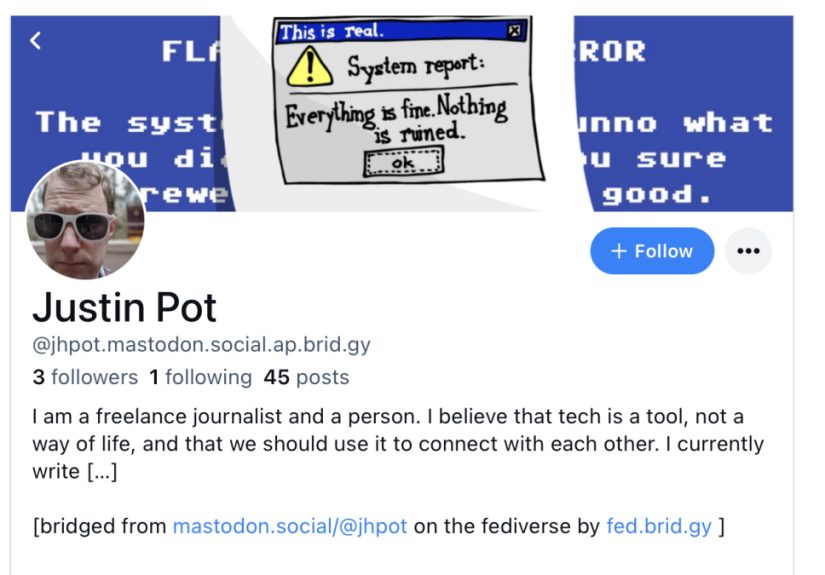
When you enable Bridgy Fed, your account becomes visible on another network through a bridged handle. If you are on Mastodon or another fediverse platform, your bridged Bluesky handle usually follows a pattern like username.instance.ap.brid.gy. If a Bluesky user bridges into the fediverse, they can appear as @[email protected].
After that, interactions can travel in both directions as much as the networks allow. A Bluesky user may follow a bridged Mastodon account. A Mastodon user may reply to a bridged Bluesky account. Likes and reposts can also move across the bridge when the original post is already bridged. It is not perfect one-to-one teleportation, but it is impressively useful.
Before You Start: What Bridgy Fed Does and Does Not Do
It Only Bridges Public Content
Bridgy Fed is designed around public posts. Fully public profiles, posts, replies, likes, and reposts may be bridged. Followers-only posts, private messages, unlisted posts, and non-public conversations are not meant to be bridged. That distinction matters. Bridging is not a secret tunnel into your private account. It is more like putting a public sign in another neighborhood that says, “Yes, this public account exists over here too.”
It Is Opt-In
For regular users, Bridgy Fed is opt-in. Your account does not suddenly appear on the other network just because the bridge exists. You have to enable it. That opt-in model is important because bridges can be powerful, and people deserve to know when their social presence is being expanded across networks.
It Does Not Connect Two Existing Accounts
If you already have a Mastodon account and a Bluesky account, Bridgy Fed does not merge those two accounts together. It does not turn them into one master account, and it does not synchronize every post between them like a traditional social media scheduler. Instead, it mirrors one account into another network as a bridged identity. If you want to copy posts between two existing accounts, you need a cross-posting tool, not Bridgy Fed.
You Cannot Log Into the Bridged Account Like a Normal Account
Your bridged account is not a separate social profile with a normal login screen, password, inbox, and app experience. Bridgy Fed owns and manages the bridged representation so it can translate activity properly. You keep using your original account, and the bridge handles the technical relay work.
How to Connect Mastodon to Bluesky with Bridgy Fed
If you are starting from Mastodon or another fediverse platform, the basic process is refreshingly simple.
- Open your Mastodon account.
- Search for
@[email protected]. - Follow that account.
- Wait for the Bridgy Fed bot to follow you back.
- If your account manually approves followers, accept the follow request.
- Post something fully public if you want to test the bridge.
Once the bridge is active, your Mastodon account can appear on Bluesky with a handle based on your fediverse address. For example, if your fediverse account is @[email protected], the bridged Bluesky-style handle may look like alex.example.social.ap.brid.gy. The exact appearance can vary depending on usernames and domain setup, but the pattern is easy to recognize once you have seen it once.
After setup, Bluesky users can search for your bridged account, follow it, and interact with your public posts. Longer fediverse posts may be shortened on Bluesky because Bluesky posts have a 300-character limit. Hashtags, links, images, videos, link previews, mentions, and alt text may also be translated where supported.
How to Connect Bluesky to Mastodon with Bridgy Fed
If you are starting from Bluesky and want to become visible to Mastodon and other fediverse users, the process is similarly straightforward.
- Open Bluesky.
- Search for
@ap.brid.gy. - Follow the account.
- Wait for Bridgy Fed to activate your bridged fediverse presence.
- Ask a Mastodon user to search for your bridged fediverse address.
A bridged Bluesky account usually appears in the fediverse as @[email protected] or a similar handle based on your Bluesky identity. If you use a custom Bluesky domain handle, the bridged fediverse address may reflect that domain.
From there, fediverse users can follow you, reply to your public posts, and interact through the bridge. Again, the best results happen when both sides have enabled bridging. If someone has not opted in, some interactions may not travel back across the bridge as expected.
How to Find Bridged Accounts
Finding accounts is where many users trip over the welcome mat. Native Mastodon search and native Bluesky search do not always behave the same way, and decentralized social search can be moodier than a printer on tax day.
Finding a Bluesky User from Mastodon
On Mastodon, search for a bridged Bluesky user using a fediverse-style address such as @[email protected]. If the Bluesky user has enabled Bridgy Fed, the account should appear as a remote fediverse profile. You can then follow it the same way you would follow someone on another Mastodon server.
Finding a Mastodon User from Bluesky
On Bluesky, a bridged fediverse account may appear with a handle like username.instance.ap.brid.gy. Search for that handle in Bluesky. If the Mastodon user has opted into the bridge, you should be able to follow the bridged account.
Requesting Someone to Bridge
If the person you want to follow has not enabled Bridgy Fed yet, you may be able to ask the Bridgy Fed bot to send them a one-time request. This is useful, but do not treat it like a confetti cannon. Not everyone wants to bridge their account, and that is completely fair. The open social web works best when it respects both connection and consent.
Privacy, Moderation, and Safety Considerations
Bridgy Fed is powerful because it expands where public conversations can travel. That also means you should think carefully before enabling it. Public posts may become easier to discover on another network. A fediverse user who bridges into Bluesky may be searchable in Bluesky even if their original fediverse settings were more conservative about discoverability. That does not mean private posts are exposed, but it does mean your public presence can become more visible.
Moderation also matters. Blocks can be bridged, and reports can be translated across networks where supported. Fediverse instance admins can still moderate bridged accounts using normal server tools. Users can still block accounts. But no bridge can erase the cultural differences between platforms. Mastodon communities often care deeply about consent, local moderation, and instance-level rules. Bluesky communities may operate with different expectations. Bridging is useful, but it is not a universal peace treaty signed by every raccoon in the internet dumpster.
Common Problems and How to Fix Them
The Bot Did Not Follow Back
If you are bridging from Mastodon, make sure your account can receive the follow request from @[email protected]. If your account requires manual approval, accept the request. If your server blocks brid.gy or bsky.brid.gy, the bridge may not work from that instance.
Your Posts Are Not Showing Up
Check whether your posts are fully public. Followers-only, quiet public, unlisted, and private posts are not the right material for the bridge. Also remember that Bridgy Fed generally works going forward; it does not automatically backfill your entire ancient posting history from the era when everyone was arguing about which app icon looked least cursed.
Your Long Mastodon Posts Look Short on Bluesky
That is expected. Bluesky has a 300-character post limit, so longer fediverse posts may be truncated. If you regularly write longer Mastodon posts, consider placing the main point in the first sentence. Treat it like an elevator pitch, except the elevator is full of developers discussing protocols.
You Changed Your Profile but the Bridged Version Looks Old
Bridgy Fed usually updates profiles automatically, but some changes may take time. If there is a manual refresh option available on your Bridgy Fed user page, use it. Also remember that decentralized networks often cache data, so different servers may update at different speeds.
Best Practices for Using Bridgy Fed
Start by bridging one main account, not every account you own. Watch how posts appear on the other network. Test a public post with text, a link, and an image. Ask a friend on the other side to reply, like, and repost. Then check whether those interactions return correctly. A five-minute test can prevent a week of “why is my account wearing a fake mustache on another platform?” confusion.
Keep your bio clear. Add a short line such as “Bridged from Mastodon” or “Bridged from Bluesky” if you think your audience may be confused. Use alt text for images because accessibility should not fall into the river just because your post crossed a bridge. Avoid posting sensitive information publicly simply because you assume only one community will see it. Once bridged, your public audience may be wider.
Finally, be patient. The open social web is still evolving. Bridgy Fed is impressive infrastructure, but infrastructure has quirks. Search may lag. Handles may look unusual. Some media may not translate perfectly. A post may arrive with the elegance of a swan or the timing of a toaster. Both outcomes are part of the current decentralized experience.
Who Should Use Bridgy Fed?
Bridgy Fed is ideal for writers, developers, journalists, creators, researchers, community managers, open-source maintainers, and everyday social media users who want to stay connected across Mastodon and Bluesky without choosing only one camp. It is especially useful if your audience is split between the fediverse and Bluesky. Instead of telling half your followers to “come find me somewhere else,” you can make your public account reachable from both sides.
It is less ideal if you want a polished brand dashboard, analytics, scheduled posts, or one-click synchronization between two accounts you already control. In that case, a social media management tool may fit better. Bridgy Fed is not trying to be a marketing suite. It is trying to make decentralized networks more connected.
Real-World Experience: What Using Bridgy Fed Actually Feels Like
Using Bridgy Fed feels a little like setting up email in the early days of the internet: once it works, it seems obvious; before it works, you may briefly question all human progress. The good news is that the basic setup is simple. Following a bot account is not exactly rocket science. The trickier part is understanding what happens afterward.
The first experience many users have is surprise. A Mastodon user follows @[email protected], accepts the follow-back, and suddenly there is a Bluesky-facing version of their account. It is a small moment, but it changes how the network feels. Bluesky stops being “that other place” and becomes another doorway into the same public conversation. That can be exciting, especially for people who spent years rebuilding audiences every time a platform changed direction, collapsed, rebranded, or decided the user interface needed twelve more tabs.
The second experience is confusion over handles. Bridged handles are useful but not always beautiful. A handle ending in .ap.brid.gy or @bsky.brid.gy can look odd at first, especially to people used to clean usernames. This is where a short profile note helps. Tell people where you are posting from. Explain that replies may be traveling through Bridgy Fed. The more transparent you are, the fewer confused messages you will receive from someone asking why your Mastodon account appears to have grown a Bluesky tail.
The third experience is learning how public “public” really is. On Mastodon, many people use unlisted posts, content warnings, smaller instances, and local community norms to shape visibility. Bluesky has a different feel, with fast-moving public conversations and search behaviors that may make posts feel more discoverable. Bridgy Fed does not bridge private posts, but it can widen the reach of public ones. That is wonderful for sharing projects, articles, announcements, art, and open discussions. It is less wonderful if you casually post something public while mentally picturing only your usual small circle. The practical lesson is simple: before bridging, review your posting habits.
The fourth experience is delight when replies cross over correctly. Seeing a Bluesky user respond to a Mastodon-originated post can feel like the social web is finally remembering what the web was supposed to be: connected, flexible, and not trapped inside one company’s garden. For creators and publishers, that is powerful. A post about a new article, podcast episode, open-source release, newsletter, research note, or event can reach people who would never have seen it if it stayed locked inside one protocol community.
The fifth experience is accepting imperfections. Not every feature maps cleanly. Edits, polls, GIF behavior, reply controls, and search indexing can vary. Some instances may block the bridge. Some users may prefer not to interact with bridged accounts. That does not make Bridgy Fed a failure; it makes it real infrastructure in a messy social world. Bridges are not valuable because rivers are easy. They are valuable because rivers are inconvenient.
In practice, the best way to use Bridgy Fed is to treat it as a connection layer, not a magic replacement for thoughtful posting. Use it for public conversations you genuinely want to share more widely. Keep your profile clear. Test posts before relying on it for important announcements. Respect people who do not want to bridge. And when something works, appreciate how unusual it is: two different decentralized networks, built on different protocols, carrying one conversation across the gap. That is not just a technical trick. It is a small preview of a healthier social web.
Conclusion
Bridgy Fed gives Mastodon and Bluesky users a practical way to connect across two different decentralized ecosystems. It does not erase every technical limitation, and it does not magically merge existing accounts. What it does is more interesting: it lets public conversations move between ActivityPub and AT Protocol communities with fewer walls in the way.
For anyone building an audience, publishing ideas, maintaining a community, or simply trying to keep up with friends scattered across platforms, Bridgy Fed is worth understanding. The setup is simple, the concept is powerful, and the result is a social web that feels a little less divided. In a world full of platforms trying to keep users fenced in, a working bridge is not just convenient. It is refreshingly rebellious.